 SFDIFY
- List your core objects (deal, customer, case, shipment) and check whether they map to standard CRM fields.
- Identify any compliance deadlines or multi-party timelines your process tracks today.
- Count how many spreadsheets or side tools currently patch gaps in your existing CRM.
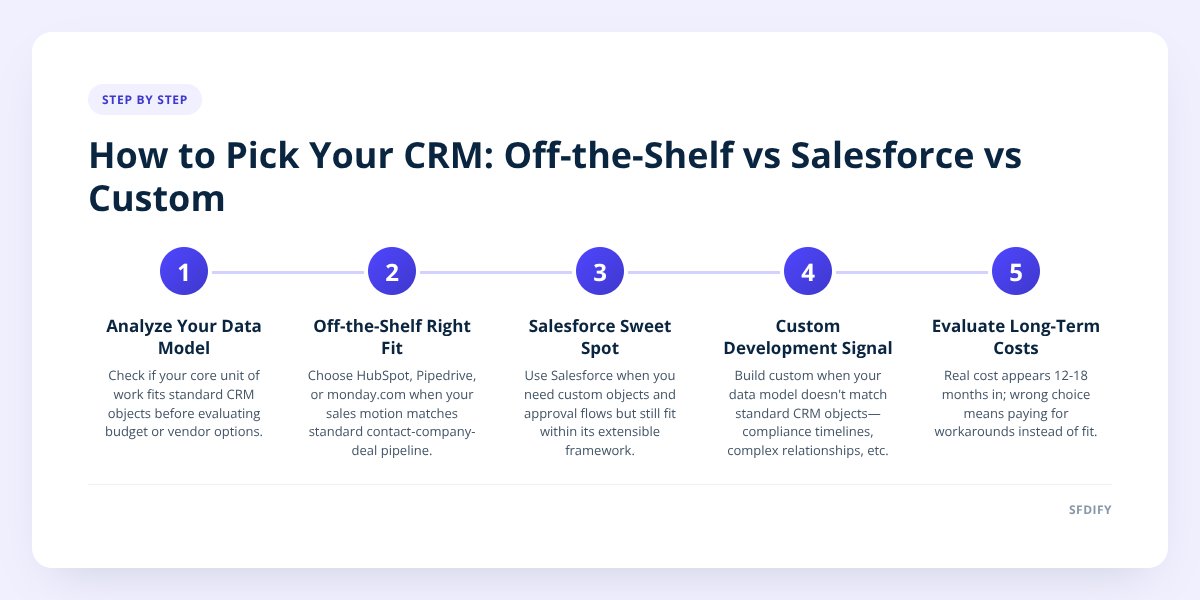
Choose off-the-shelf software (HubSpot, monday.com, Pipedrive) when your sales process looks like most companies' sales processes. Choose Salesforce when you need deep customization but want a platform underneath it with a large ecosystem of apps and partners. Choose custom CRM development when your process has rules, data, or workflows that don't map to any standard pipeline-and-contact-record model. The decision comes down to how much your process deviates from the default, not budget alone.
- Off-the-shelf tools fit standard sales motions (lead, opportunity, close) and cost the least to start, often under $100 per user monthly.
- Salesforce configuration suits companies that need custom objects, approval flows, or integrations but still want a known platform and hiring pool underneath.
- Custom CRM development makes sense when the core data model itself doesn't match standard CRM objects, not just when you want extra features.
- The real cost of the wrong choice shows up 12-18 months in, when you're paying for workarounds instead of the tool working for you.
1. How do we know which CRM category actually fits?
Look at your data model before you look at your budget. If your core unit of work is a straightforward deal moving through stages, with a person and a company attached, any standard CRM handles that out of the box.
Problems start when the thing you track doesn't look like a deal. We wrote about this exact fork in Custom CRM Development vs. Salesforce Customization: the question isn't "do we like Salesforce," it's "does our process fit inside objects that already exist."
A few signs your process doesn't fit a standard model:
- Your "deal" has multiple interdependent timelines (a loan with a property, an inspection, and a lender, each on its own clock).
- You need to track compliance expirations tied to people, not companies — a license, a certification, an insurance policy.
- Your pipeline branches based on conditions no off-the-shelf tool models as a first-class field.
If none of those apply, stop evaluating custom options. You'll pay more to rebuild what a $50-a-month tool already does.
2. When is off-the-shelf CRM software the right call?
Off-the-shelf is right when your sales motion is close to the median and your main cost pressure is speed, not fit. Tools like HubSpot, Pipedrive, and monday.com — we hold a monday.com CRM certification — are built around the same basic objects: contact, company, deal, stage. If that's genuinely how your team sells, there's no reason to build anything.
The advantage isn't just price. It's that someone else maintains the product, patches security issues, and ships new features on their own schedule. You trade some flexibility for near-zero engineering overhead.
Where this breaks down: teams stretch an off-the-shelf tool with custom fields, workarounds in spreadsheets, and Zapier chains until the "simple" tool is actually three tools duct-taped together. That's usually the signal to reevaluate, not a reason to add one more automation.
3. When does Salesforce configuration make more sense than buying something simpler?
Salesforce earns its complexity when you need real customization but still want a platform, not a from-scratch build. Salesforce's object model (leads, accounts, opportunities, custom objects) can be extended further than most off-the-shelf tools allow, and its partner ecosystem means you can usually find a pre-built app instead of writing one.
As a Salesforce Partner, we see this fit most often with companies that have outgrown a simple pipeline tool but don't have a data model so unusual that Salesforce's framework can't represent it. Custom objects, validation rules, and approval processes cover a lot of ground that would otherwise require custom engineering.
The tradeoff is cost and complexity of ownership. Salesforce licensing plus implementation plus an admin (internal or contracted) adds up fast, and a misconfigured org can be as hard to maintain as custom code — just harder to debug because you didn't write it. We go deeper on where Salesforce configuration hits its ceiling in Custom CRM Development vs. Salesforce Customization.
If you can describe your process entirely using Salesforce's standard objects plus a few custom fields, configure Salesforce. If you need custom objects wired together with logic Salesforce doesn't model naturally, that's your signal to scope a custom build instead.
4. When is custom CRM development worth the cost?
Custom development is worth it when the system needs to model your business, not a generic sales process with your logo on it. This is the option founders avoid first and reach for too late, usually after 18 months of fighting a tool that was never built for their workflow.
A clear example from outside the CRM world but the same logic: Yolda, our AI-native transportation management system, exists because trucking dispatch, safety compliance (CDL and medical card expirations), and driver pay don't map onto any standard CRM or off-the-shelf TMS object model. The data relationships — a load tied to a driver tied to a truck tied to a compliance deadline — needed a system built around them, not retrofitted onto one.
The same reasoning applies to CRM. If your "customer" isn't really a company with contacts and deals, but something more like a case, a policy, a property, or a shipment with its own lifecycle and compliance rules, a custom CRM lets the schema match reality instead of forcing reality into someone else's schema.
Standard CRM object: Deal -> Stage -> Close Date
Custom-fit object: Shipment -> Load -> Driver -> Compliance Window -> Payout
That second shape doesn't flatten into a pipeline view without losing information.
5. What does each option actually cost and who is it for?
| Option | Best for | Typical cost pattern | Effort to maintain |
|---|---|---|---|
| Off-the-shelf (HubSpot, Pipedrive, monday.com) | Standard sales pipeline, small-to-mid teams, fast setup | Lowest upfront, per-seat monthly fee | Low — vendor handles updates and infrastructure |
| Salesforce (configured) | Teams needing custom fields, approvals, or integrations, with budget for an admin | Mid-to-high: licensing plus implementation plus ongoing admin time | Medium — depends on org complexity and who manages it |
| Custom CRM | Processes with a data model that doesn't fit standard objects | Highest upfront, no per-seat licensing fee | Medium-to-high — your team or a dev partner owns the roadmap |
Our take: start with off-the-shelf unless you already know your process won't fit — don't pay for flexibility you won't use. Move to Salesforce configuration when you've outgrown a simple pipeline tool but your data model is still recognizably sales-shaped. Go custom only when you can point to a specific relationship (compliance deadlines, multi-party timelines, branching logic) that no standard object model represents cleanly. We covered what that build timeline actually looks like in Custom CRM Development: Discovery to Go-Live.
6. How does this shape the way we build CRMs for clients?
We don't default to custom work because it's what we sell. Most engagements start with a discovery conversation where we map the client's actual process against standard CRM objects first, and if it fits, we say so — sometimes that means recommending Salesforce configuration or an off-the-shelf tool instead of a custom build.
When a client's process genuinely doesn't fit, we scope the smallest version that proves the data model works before building the rest, the same approach we laid out in How to Scope an MVP Without Building the Whole Product. That's how we avoid the common failure mode: a custom system that took a year to build and still doesn't match the workflow, because nobody tested the core model early.
If you're weighing these options for your own team, SFDIFY offers a free first consultation to map your process against what's available before you commit to a build. You can start that conversation at sfdify.com/contact or by emailing info@sfdify.com.
Checklist: Choosing between custom, Salesforce, and off-the-shelf CRM
- List your core objects (deal, customer, case, shipment) and check whether they map to standard CRM fields.
- Identify any compliance deadlines or multi-party timelines your process tracks today.
- Count how many spreadsheets or side tools currently patch gaps in your existing CRM.
- Price out one quarter of admin or engineering time against one quarter of per-seat licensing fees.
- Ask whether a Salesforce custom object could represent your edge case before assuming you need custom code.
- Write down the one workflow that, if it broke, would stop sales from functioning — test any new tool against that first.
- Confirm who will own ongoing maintenance before you sign a contract or start a build.
Checklist: Choosing between custom, Salesforce, and off-the-shelf CRM
- List your core objects (deal, customer, case, shipment) and check whether they map to standard CRM fields.
- Identify any compliance deadlines or multi-party timelines your process tracks today.
- Count how many spreadsheets or side tools currently patch gaps in your existing CRM.
- Price out one quarter of admin or engineering time against one quarter of per-seat licensing fees.
- Ask whether a Salesforce custom object could represent your edge case before assuming you need custom code.
- Write down the one workflow that, if it broke, would stop sales from functioning — test any new tool against that first.
- Confirm who will own ongoing maintenance before you sign a contract or start a build.