 SFDIFY
- Write down the one assumption that, if false, means the product shouldn't exist.
- Draw the single user workflow from entry to outcome, with no branches.
- List every feature you're tempted to add and cross out anything that doesn't test the core assumption.
Most founders scope an MVP by listing every feature they eventually want, then quietly removing a few. That is not scoping. That is procrastinating with a smaller checklist. The only real scoping question is: what is the one thing we don't know yet that could kill this, and what is the smallest build that answers it?
To scope an MVP, pick the single riskiest assumption behind your product — the thing that, if false, means the product shouldn't exist — and build only what's needed to test that assumption with real users. Everything else, including features you're sure you'll need later, waits. A good MVP scope usually fits in 4 to 8 weeks of work, not 4 to 8 months.
- Start by naming the riskiest assumption, not the full feature list — the build exists to test that one thing.
- A scoped MVP typically has one core workflow, one user type, and no admin dashboard, settings panel, or edge-case handling.
- Cutting scope is a sequence of decisions, not one meeting: define the risk, draw the one workflow, list what's out loud, pick the stack, then set the kill-or-keep metric before you write code.
- The same discipline applies whether you're validating a new consumer app or a feature inside an existing platform — the cut is smaller, not absent.
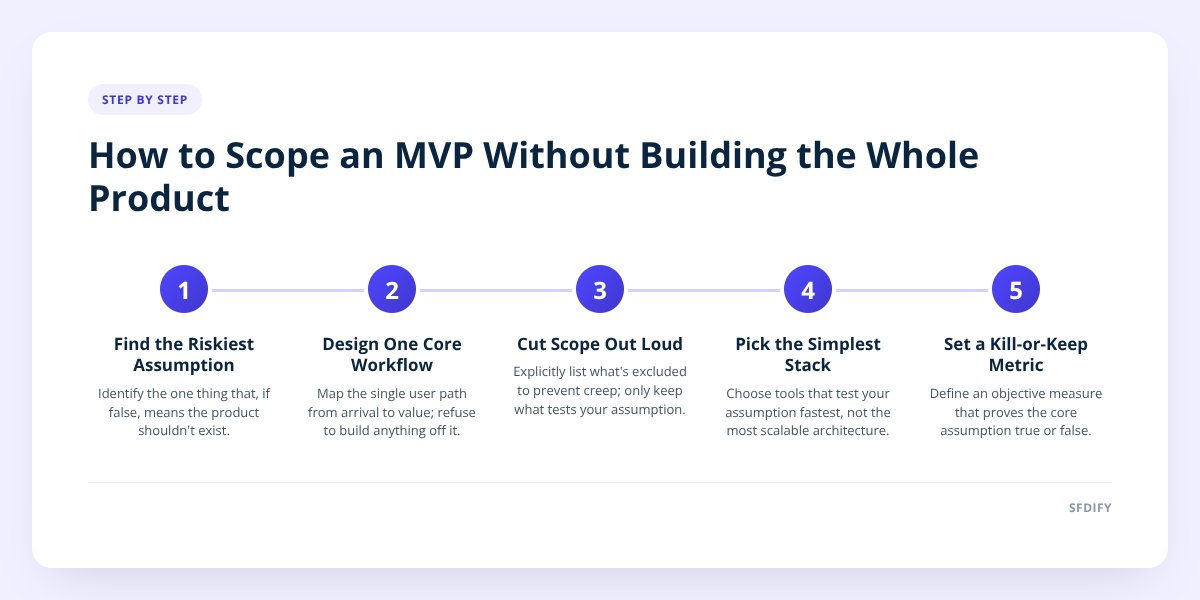
1. How do we find the riskiest assumption?
We ask what has to be true for this product to matter, then rank those things by how likely they are to be false. The riskiest assumption is rarely "can we build this." It's almost always "will anyone change their behavior for this."
When we were shaping MyCheck, the risky assumption wasn't whether we could build checklists with reminders — that's straightforward engineering. It was whether people would actually finish a checklist instead of abandoning it like they do with notes apps and to-do lists. So the first build focused entirely on completion: reminders, shared lists, and a simple finish state. Features like USCIS case tracking and Roadmaps came after we saw people stick with the basic loop.
A fast way to find your riskiest assumption: finish the sentence "this product only works if ___ is true." If you can't finish it with something specific, you haven't picked a direction yet — you've picked a category.
2. How do we turn that risk into one workflow?
We draw the single path a user takes from arriving to getting value, and we refuse to build anything off that path. One workflow means one user type, one entry point, and one outcome — not three personas with slightly different needs.
For an AI agent or chatbot, that one workflow is usually: a user asks a question, the system answers correctly, the user takes an action. No settings, no multi-language support yet, no fallback flows for every edge case. We cover what we test before anything ships in Shipping AI Features: The 5 Checks We Run First — the same narrowing applies before those checks even start.
A workflow sketch for an MVP should answer four things in order:
- Who is the one user we're building for first — not the eventual audience, the first one.
- What's the one action that proves the product works.
- What's the shortest path to that action, with no optional steps.
- What tells us, objectively, that it worked.
If your sketch has branches — "if the user is a manager, then X; if they're an employee, then Y" — you've scoped two products. Pick one.
3. What do we deliberately leave out, and say so out loud?
We leave out anything that doesn't test the riskiest assumption, even if it feels obviously necessary. Saying the cut list out loud — in writing, to the team and the client — stops it from quietly creeping back in during week two.
Common things we cut from a first release:
| Usually cut from MVP | Added later, once validated |
|---|---|
| Multi-language support | Added after demand is confirmed (MyCheck now supports 13 languages) |
| Admin dashboard / reporting | Added once there's enough usage data to report on |
| Payment plans beyond one tier | Added once pricing sensitivity is tested |
| Full error handling for rare cases | Added as real errors surface in use |
| Native mobile app for both platforms | Often one platform first, or a cross-platform build to cover both at once |
| Role-based permissions | Added once more than one user type is actually using it |
if a feature doesn't change whether the riskiest assumption is proven true or false, it doesn't belong in the first release.
For Yolda, the AI-native TMS we built for trucking companies, the earliest priority was reading rate confirmations into loads correctly — because if that extraction isn't accurate, dispatchers won't trust the system with anything else. Driver-facing bonus withdrawals and the full safety and hiring modules came after that core trust was established, not before.
4. How do we choose the stack for an MVP without overbuilding the architecture?
We pick the stack that lets us test the riskiest assumption fastest, not the one that scales best at a size we haven't earned yet. Over-engineering the architecture is one of the most common ways teams blow an MVP timeline without adding any real learning.
A short decision check:
Does this need to handle scale today? -> No -> pick the simpler stack
Does this need offline support today? -> No -> skip it for v1
Will changing this later require a rewrite? -> If no, defer it
Is this choice reversible in under a week? -> If yes, don't overthink it
We built Yolda with Go, Next.js, and Flutter because those choices support both a web dispatch system and a driver app without duplicating logic — a reasonable long-term call, made early because it didn't cost extra time up front. That's different from, say, building a custom caching layer for a product with no users yet. One is a sound default; the other is scope creep wearing an engineering disguise.
If you're deciding between a web app, a mobile app, or both for your first release, we go through that trade-off in Website vs. App: What Should Your Business Build First?
5. How do we know when the MVP has done its job?
An MVP is done answering its question when you have a clear yes or no on the riskiest assumption — not when the feature list is complete. Before writing any code, we set the specific metric that will give that answer, so "success" isn't redefined after the fact based on whatever numbers happen to look good.
Examples of a clean kill-or-keep metric:
- Percentage of users who complete the one core workflow without help, measured against a threshold you set before launch.
- Number of returning users in the first two weeks, compared to a baseline you'd expect from paid acquisition alone.
- Whether users request the feature you deliberately left out — a sign it's needed now, not later.
If the metric is weak, the whole exercise just produces a prettier opinion. We've seen teams launch an MVP, get lukewarm numbers, and keep building anyway because no one agreed in advance what "lukewarm" meant. Decide the bar before you see the data.
Checklist: scoping an MVP
- Write down the one assumption that, if false, means the product shouldn't exist.
- Draw the single user workflow from entry to outcome, with no branches.
- List every feature you're tempted to add and cross out anything that doesn't test the core assumption.
- Share the cut list with your team or client in writing before development starts.
- Choose the simplest stack that answers the question, deferring anything reversible.
- Set the specific metric that will tell you pass or fail, before you see any data.
- Build only the core workflow, skipping admin tools, settings, and edge cases.
- Launch to a small real audience, not an internal demo.
- Review the metric against the bar you set, not against how the launch "felt."
- Decide what gets added next based on what users actually asked for.
How this shapes the way we build for clients
This is the same sequence we run before any client engagement, whether the end product is an AI agent, a SaaS platform, or a mobile app. We'd rather spend an extra conversation narrowing the riskiest assumption than spend extra weeks building features nobody asked to test yet. It's also why MVP work tends to go faster with a team that builds and runs its own products day to day — we've made these same cuts on MyCheck, Yolda, and the rest, not just advised on them.
If you're trying to figure out what your first release should actually include, visit our MVP development page, or start a project with SFDIFY and we'll help you find the one question worth answering first.
Checklist: scoping an MVP
- Write down the one assumption that, if false, means the product shouldn't exist.
- Draw the single user workflow from entry to outcome, with no branches.
- List every feature you're tempted to add and cross out anything that doesn't test the core assumption.
- Share the cut list with your team or client in writing before development starts.
- Choose the simplest stack that answers the question, deferring anything reversible.
- Set the specific metric that will tell you pass or fail, before you see any data.
- Build only the core workflow, skipping admin tools, settings, and edge cases.
- Launch to a small real audience, not an internal demo.
- Review the metric against the bar you set, not against how the launch "felt."
- Decide what gets added next based on what users actually asked for.