 SFDIFY
- Pick one job for the first agent — lead qualification, not general chat.
- Write down the fixed question set the qualifier will ask, no more than four or five questions.
- Define what counts as a qualified lead and where it routes.
Most teams that bring in AI agents try to automate every conversation on day one — sales, support, scheduling, billing questions — and the thing collapses under its own scope within a month. We've seen this pattern enough times building AI agents for clients and for our own products to know the fix: start narrow, prove it, then widen.
Deploy a lead qualifier first, not a general chatbot. A narrow agent that asks three or four questions and routes the answer converts better and breaks less than a broad one trying to handle sales, support, and scheduling at once. After qualification, add call booking and reminders, then FAQ routing for tier-1 support. Each step should run cleanly for a few weeks before you add the next.
- A lead qualifier with a fixed, short question set outperforms an open-ended chatbot because it has less room to go off-script or hallucinate.
- Automated booking confirmations and reminders remove a manual step that sales reps often skip or delay, which is where no-shows start.
- A simple decision tree — can the agent answer this from documented information, yes or no — is enough to split tier-1 support from everything that needs a human.
- The most common agent failures are scope creep, hallucinated answers, and a loss of trust after one bad interaction, all of which are prevented by narrow scope and clear escalation rules, not more model power.
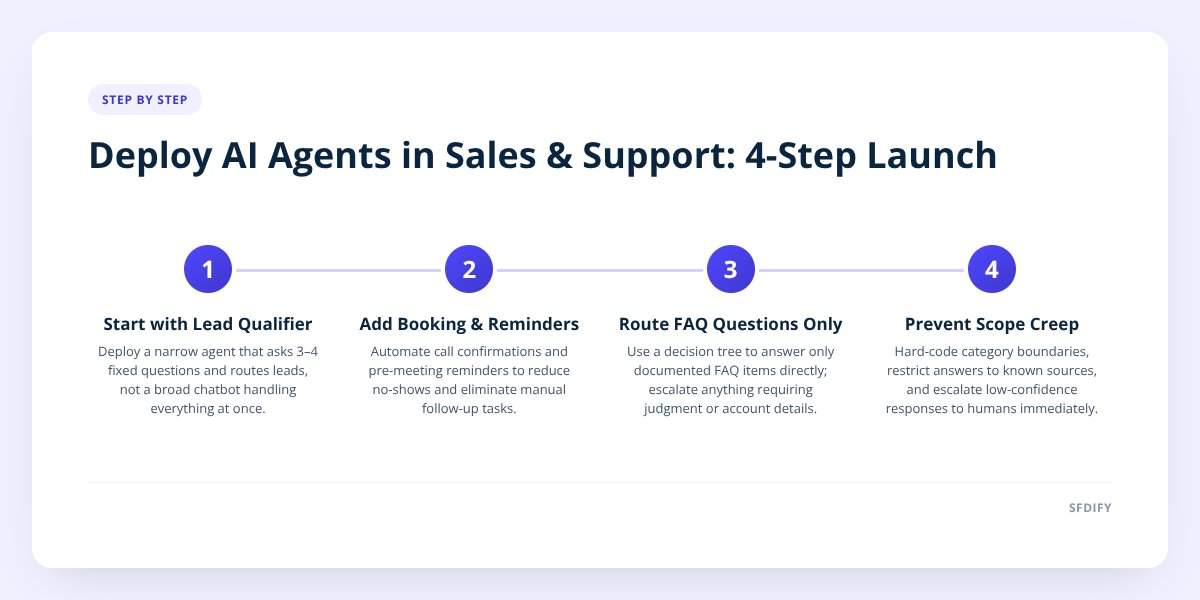
1. Why your first agent should qualify leads, not chat about anything
A lead qualifier's job is narrow: ask a fixed set of questions, score the answers, and route the result. That narrowness is the entire advantage.
When we built MuChat, our Instagram DM automation product, the agents that performed best on comment-to-DM and story-reply flows were the ones with a defined path — capture an email, ask one qualifying question, hand off to a sequence. Flows that tried to handle open-ended product questions and objections in the same conversation needed far more correction over time.
The same holds in client deployments. A chatbot with no fixed scope will eventually get asked something it can't answer well, and it either guesses or stalls. A qualifier only has to do one job: figure out if this person is worth a sales rep's time, and if so, what they want.
If your first AI agent can't fail gracefully by saying "let me connect you with someone," its scope is too wide.
Start here because it's measurable. You can see qualification accuracy, you can see what gets escalated, and you can tighten the question set before you ever touch booking or support.
2. Automate booking and reminders next — it's the easiest real win
Booking and reminder automation is the highest-leverage second step because it replaces a manual task that's easy to skip under load. A rep juggling fifteen leads is the one most likely to forget the Tuesday reminder email, and that's exactly when a no-show costs you the meeting.
An agent that confirms a booked call and sends a reminder doesn't need judgment — it needs reliability. That makes it a safe second deployment: low ambiguity, high frequency, and a direct line to a metric your sales team already tracks, which is show-up rate.
We covered the mechanics of this in more depth in AI Agents Are Booking Your Services Without Site Visits, including how agents handle scheduling for service businesses without a human touching the calendar.
What this step should include:
- Confirm the booking immediately, in the same channel the lead used to book.
- Send at least one reminder ahead of the call, with an easy reschedule option.
- Flag no-shows back to the rep automatically instead of leaving it to memory.
- Log every confirmation and reminder so you can see where leads drop off.
This is the step most teams underrate because it feels too simple to be worth building. It's also the one with the clearest payoff, because the task it replaces was never complicated — it was just inconsistently done.
3. Route FAQs to the agent, escalate everything else
An AI agent should handle a support question only when the answer already exists, word for word, in a document you control. If the answer requires judgment, account-specific detail, or anything not already written down, it routes to a human. That's the entire decision tree.
Is the answer in our documented FAQ or policy?
  Yes → agent answers directly, cites source
  No  → does it involve account-specific data?
          Yes → route to human
          No  → agent attempts, flags low confidence
This is where most of the time savings live, because tier-1 support questions — pricing tiers, hours, how a feature works, where to find a setting — repeat constantly and rarely change. An agent that only answers from a fixed knowledge base, and says so when it can't, protects your team's time without putting your support reputation at risk.
The trap here is letting the agent "try its best" on a question outside its documented scope. That's where hallucination creeps in. The agent should have a visible, low confidence threshold, and anything under it goes to a person — not a guess.
4. Why AI agents backfire, and how to keep yours from doing it
AI agents fail in three predictable ways: scope creep, hallucination, and a single bad interaction that destroys a customer's trust in the whole system. All three trace back to the same root cause — asking the agent to do more than it was scoped and tested for.
| Failure mode | What it looks like | What fixes it |
|---|---|---|
| Scope creep | Agent starts answering billing, refund, or legal questions it was never trained on | Hard-code category boundaries; anything outside routes out |
| Hallucination | Agent invents a policy, price, or feature that doesn't exist | Restrict answers to a fixed knowledge source with citations, not open generation |
| Trust collapse | One wrong answer makes the customer distrust every future agent reply | Make escalation to a human fast and visible, not a last resort |
Scope creep usually happens gradually. A qualifier starts answering pricing questions because it's convenient, then starts answering support questions because it's already in the conversation. Six months later nobody remembers it was supposed to do one thing.
The fix isn't a smarter model — it's a narrower one. Every agent we deploy, whether for a client or inside Yolda, our AI-native TMS for trucking companies, gets evaluation and guardrails scoped to its specific job before it goes live. Yolda's dispatch agent reads rate confirmations and tracks compliance dates like CDL and insurance expirations — it doesn't try to also handle driver pay disputes, because that needs a person with context the agent doesn't have.
Trust collapse is the quiet one. A customer who gets one wrong answer from a bot doesn't file a complaint — they just stop trusting the bot, and often the brand, going forward. That's why fast, visible escalation matters more than squeezing out one more automated answer.
5. How this shapes the way we build agents for clients
We build every AI agent with evaluation and guardrails as part of the scope, not an afterthought — this is a core part of our AI agents and chatbots work and part of why SFDIFY is an OpenAI Select Partner. That partnership doesn't change what a project costs or how fast it ships; it reflects how we approach the underlying model work.
In practice this means we never hand a client a single do-everything agent on day one. We start with the narrowest version that moves a real number — qualified leads, booked calls, resolved tier-1 tickets — and expand scope only after that version holds up under real traffic for a few weeks. If a client wants to know what an AI build like this actually costs before committing, we laid out the real numbers in What an AI App Actually Costs to Build.
If you're trying to figure out which of your own processes are actually ready for this, that's a scoping conversation, not a guess — start one at SFDIFY.
Checklist: deploying your first AI agent without breaking sales ops
- Pick one job for the first agent — lead qualification, not general chat.
- Write down the fixed question set the qualifier will ask, no more than four or five questions.
- Define what counts as a qualified lead and where it routes.
- Add booking confirmation and a single reminder before touching anything else.
- Log every no-show and reschedule so you can see the real impact.
- Build the FAQ decision tree before routing any support questions to the agent.
- Set a visible confidence threshold for support answers, below which it escalates.
- Watch the first two weeks of transcripts manually before trusting the agent unsupervised.
- Expand scope only after the current step runs clean for a few weeks straight.
Checklist: deploying your first AI agent without breaking sales ops
- Pick one job for the first agent — lead qualification, not general chat.
- Write down the fixed question set the qualifier will ask, no more than four or five questions.
- Define what counts as a qualified lead and where it routes.
- Add booking confirmation and a single reminder before touching anything else.
- Log every no-show and reschedule so you can see the real impact.
- Build the FAQ decision tree before routing any support questions to the agent.
- Set a visible confidence threshold for support answers, below which it escalates.
- Watch the first two weeks of transcripts manually before trusting the agent unsupervised.
- Expand scope only after the current step runs clean for a few weeks straight.