 SFDIFY
- Price the model API cost as a monthly operating expense, not a one-time fee.
- Write a real test set of inputs and correct answers before writing the feature.
- Score the cost of a wrong answer — annoyance, wasted time, or real financial or safety harm.
An AI feature costs more than a normal software feature because you're paying for three things a regular app doesn't need: evaluation (testing that the model gives correct answers), guardrails (stopping it from doing damage when it doesn't), and ongoing model spend that continues every month after launch. A simple AI chatbot or copilot built on top of an existing app might add tens of thousands of dollars to a project; a from-scratch AI product with its own evaluation pipeline and data infrastructure costs substantially more. The number depends less on the model you pick and more on how wrong an answer is allowed to be.
- AI features need evaluation and guardrail work that normal software features don't — this is often the single biggest line item people forget to budget.
- Model API costs don't stop at launch. Every user conversation costs money for as long as the product runs, unlike a one-time feature you build once and forget.
- The cost of a wrong answer should drive your budget more than the cost of the model. A wrong product recommendation and a wrong medical or financial answer need very different levels of testing.
- Teams that skip evaluation at the start almost always pay for it later, in support tickets, lost trust, or a rebuild.
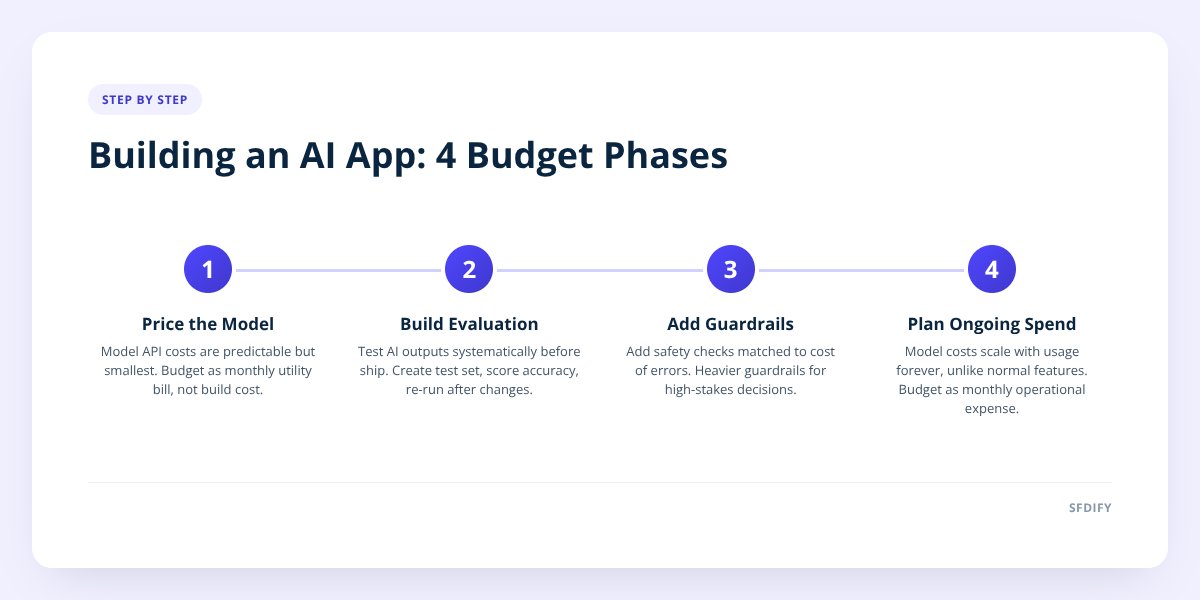
1. Start by pricing the model, because it's the smallest number
The API cost of running an AI model is usually the cheapest line in the budget, not the most expensive. Founders often ask "which model should we use" first, assuming that choice drives the price tag. In practice the model fee is a predictable, metered cost — you pay per request or per token — and it's dwarfed by the engineering work around it.
Where we build generative AI features for clients, the model call itself is rarely the hard part. The hard part is everything that has to happen before and after the model answers: pulling the right data into the prompt, checking the answer before it reaches the user, and logging what happened so you can fix it later. Budget the model cost as a monthly operating expense, not a one-time build cost — it behaves more like a utility bill than a feature price.
2. Build evaluation before you build the feature
Evaluation means systematically testing whether the AI gives correct, useful answers across a wide range of inputs — and it has to exist before you ship, not after. A normal software feature either works or throws an error; an AI feature can confidently return something wrong, and nothing in the code will flag it. You find out from an angry user or a support ticket.
This is the part most cost estimates leave out entirely. Evaluation work includes:
- Writing a test set of real questions or inputs the feature will actually face
- Scoring outputs against a standard of "correct enough to ship"
- Re-running that test set every time you change the prompt, the model, or the data source
- Tracking accuracy over time so a model update doesn't quietly make things worse
For something like an internal AI agent that extracts data from documents, this looks like feeding it a stack of real documents with known correct answers and checking the extraction rate before it ever touches production. We do this when building document-reading AI for client products — the evaluation set is built alongside the feature, not bolted on afterward.
3. Add guardrails sized to the cost of being wrong
Guardrails are the rules and checks that stop an AI feature from doing something harmful, embarrassing, or expensive when it's uncertain or wrong — and how much you need depends entirely on what a wrong answer costs you. This is the single biggest driver of AI development cost, more than the model, more than the UI.
Think of it on a spectrum:
| What's at stake if the AI is wrong | Guardrail level needed | Example |
|---|---|---|
| Minor annoyance, easily corrected | Light — basic output filtering | AI suggests a blog topic you don't like |
| Wasted time, redone work | Medium — confidence scoring, human review for edge cases | AI drafts a reply that needs editing |
| Money moves, compliance exposure, safety | Heavy — multiple checks, audit logs, human sign-off | AI reads a rate confirmation and creates a load, or touches tax or medical data |
A chatbot that recommends blog topics can tolerate an occasional bad suggestion. A system that extracts data from a document and feeds it into a business process — the kind of work we do in Yolda, our AI-native trucking platform, where the system reads rate confirmations into loads and watches CDL, medical card and insurance expiration dates — cannot tolerate silent errors, because a missed expiration date has real consequences for a carrier. The guardrail work for that second case is far more expensive, and it should be.
price the guardrails to match the cost of the AI being wrong, not the cost of the model being used.
4. Budget the ongoing model spend separately from the build
Model spend doesn't end at launch — it scales with usage, which means your AI feature has a monthly cost that a normal feature simply doesn't. A dashboard you build once costs you nothing extra when a hundred more people start using it. An AI feature that answers questions costs more every time someone asks one.
This changes how you should think about the budget:
Normal feature:  build cost (one time) + hosting (flat)
AI feature:      build cost (one time)

                 + evaluation (one time, then ongoing)
                 + guardrails (one time, then ongoing)
                 + model spend (scales with usage, forever)
Plan for model spend the way you'd plan for a cloud hosting bill that grows with traffic — not a cost you can fix once and ignore. We've written in detail about how usage-based costs shift a software budget after launch in Mobile App Maintenance Costs: A Post-Launch Budget Guide, and the same logic applies to AI spend specifically: it's an operating cost, and it needs its own line in the budget, reviewed monthly, not folded into a one-time estimate.
5. Decide how much AI the product actually needs
Not every feature that could use AI should use AI, and this decision alone can cut your cost significantly. The fastest way to overspend on an AI app is to add AI to a part of the product where a simpler rule or a plain search function would do the job just as well, without evaluation or guardrails at all.
Ask these questions before committing to an AI-powered version of a feature:
- Does the input vary enough that fixed rules can't handle it? (If not, you don't need AI.)
- Is a wrong answer tolerable, or does it need a human check every time?
- Will usage be high enough that the ongoing model cost matters, or is this a low-volume internal tool?
- Could a simpler, cheaper approach hit 80% of the value without the evaluation overhead?
We go through this exercise with clients before any AI code gets written, because it's often the cheapest hour in the whole project — it's the subject of our AI consulting work, and it regularly changes the scope of what gets built.
Checklist: Budgeting an AI app before you build it
- Price the model API cost as a monthly operating expense, not a one-time fee.
- Write a real test set of inputs and correct answers before writing the feature.
- Score the cost of a wrong answer — annoyance, wasted time, or real financial or safety harm.
- Size your guardrails to match that cost, not to match the model you chose.
- Set a monthly budget line for model spend that scales with usage.
- Check each proposed AI feature against a simpler, non-AI alternative first.
- Plan a review cycle for re-running evaluation whenever the model or prompt changes.
How this shapes what we build
When we scope an AI product at SFDIFY, we price evaluation and guardrails as their own line items, not as an afterthought folded into "development." That's the approach behind our own products — MyCheck's checklist reminders stay simple because they don't need heavy guardrails, while Yolda's document extraction and compliance tracking get a much heavier evaluation pass, because the cost of missing an expired insurance date is real. We talked through what makes an AI build investor-ready, including this same evaluation question, in How to Build an AI MVP That Actually Attracts Investors. The same thinking applies whether you're scoping a client project or deciding where to spend your own budget first.
If you're trying to figure out what your AI feature should actually cost — and whether it needs to be AI at all — start a project with us. The first consultation is free.
Checklist: Budgeting an AI app before you build it
- Price the model API cost as a monthly operating expense, not a one-time fee.
- Write a real test set of inputs and correct answers before writing the feature.
- Score the cost of a wrong answer — annoyance, wasted time, or real financial or safety harm.
- Size your guardrails to match that cost, not to match the model you chose.
- Set a monthly budget line for model spend that scales with usage.
- Check each proposed AI feature against a simpler, non-AI alternative first.
- Plan a review cycle for re-running evaluation whenever the model or prompt changes.