 SFDIFY
- List the 15-20 questions your team answers most often — this is your real knowledge scope.
- Decide where the source answers currently live, and whether that source changes weekly or yearly.
- Identify every system the bot would need to read from or write to, by name.
A quote of "$5,000 for a chatbot" and a quote of "$150,000 for a chatbot" can both be honest answers to the same question, because they're describing different machines wearing the same name. We've built chatbots that are mostly a script with a few branches, and we've built ones that read documents, call internal systems, and know when to hand off to a person. The price difference is almost never the chat window. It's what sits behind it.
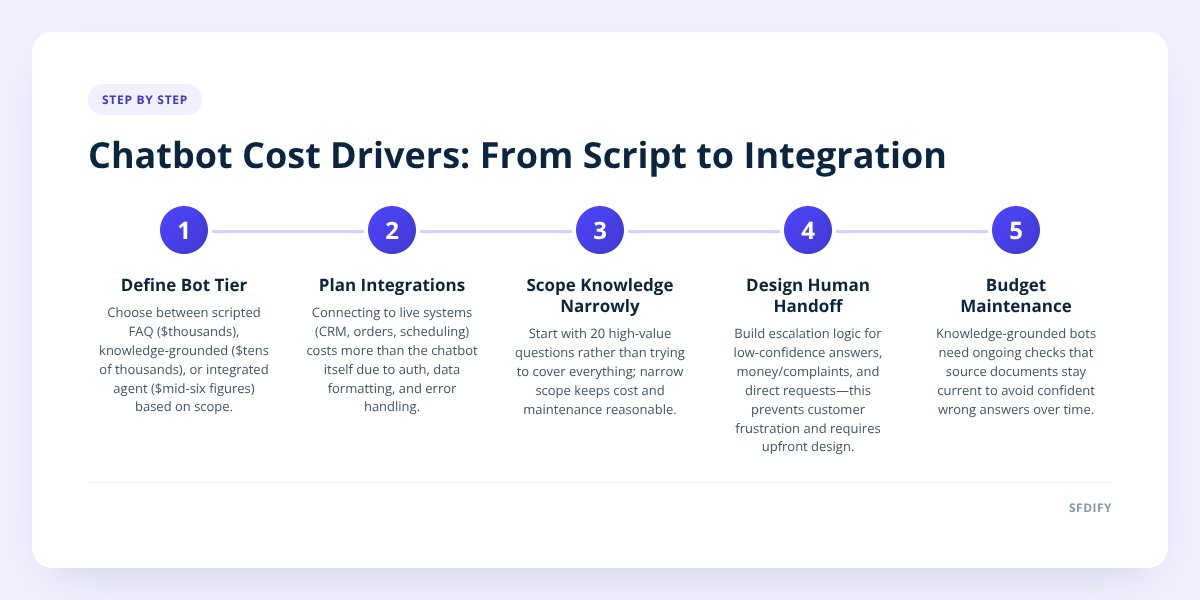
A basic chatbot that answers FAQs from a fixed script can run a few thousand dollars and take two to four weeks. A chatbot that pulls live answers from your actual knowledge base, connects to tools like your CRM or order system, and escalates cleanly to a human typically lands in the tens of thousands and takes two to four months. The three cost drivers are how much knowledge it needs, how many systems it must talk to, and how reliably it needs to hand off when it doesn't know the answer.
- The biggest cost swing comes from integrations, not conversation design — connecting to a live order system or CRM costs far more than writing good scripted replies.
- A chatbot that only reads static FAQ text is cheap to build and cheap to get wrong; one that pulls from a changing knowledge base needs ongoing maintenance built into the budget.
- Escalation to a human is a feature you have to design, not a fallback that happens automatically — skipping it is the most common reason chatbots frustrate customers.
- We cover the broader cost picture, including how AI features price out against traditional software, in what an AI app actually costs to build.
1. How much does a chatbot actually cost?
Most chatbot projects fall into three tiers, and the tier is set by what the bot needs to know and do, not by how polished the conversation sounds.
| Tier | What it does | Typical range | Typical timeline |
|---|---|---|---|
| Scripted FAQ bot | Answers a fixed set of questions from a written script | A few thousand dollars | 2-4 weeks |
| Knowledge-grounded bot | Answers from your live docs, policies, or product catalog | Low to mid five figures | 6-10 weeks |
| Integrated agent | Reads and writes to your systems (CRM, order status, scheduling) plus human handoff | Mid five figures to low six figures | 2-4 months |
A scripted bot is a decision tree wearing a chat interface. It's cheap because there's nothing to connect and nothing to keep in sync — you write the answers once and they don't change until you edit them.
The jump to a knowledge-grounded bot happens the moment your answers live somewhere that changes: a help center, a pricing page, a policy document. Now the bot needs a pipeline that keeps its knowledge current, which is engineering work, not just writing.
2. Why does connecting the bot to your systems cost more than the bot itself?
Because the chat window is the easy part — the integration is where the bot has to behave correctly inside someone else's system, with someone else's data rules. A bot that says "your order ships Tuesday" has to actually query your order system, format the result, and handle the case where the system is slow or down. A bot that just says "check your email for shipping updates" doesn't.
We saw this directly building Yolda, our AI-native TMS for trucking companies. Reading a rate confirmation document and turning it into a usable load record isn't a chat feature — it's document extraction logic that has to handle messy, inconsistent paperwork and then write clean data into the right place. The conversational layer on top is almost incidental to the engineering effort underneath it.
Integration cost usually comes from:
- Authentication and permissions — the bot needs credentials to read or write data, and someone has to decide what it's allowed to touch.
- Data formatting — your CRM, order system, or scheduling tool each structure data differently, and the bot has to translate between them.
- Error handling — what the bot says when the system it's querying times out or returns nothing.
- Rate limits — many business tools cap how often an external service can call them, which shapes how the bot is built.
If you're mapping this against a broader software budget, we go deeper on the phase-by-phase breakdown in how to budget for custom app development, phase by phase.
3. Does the bot need to know your whole business, or just one part of it?
Scope the knowledge narrowly first — a bot that answers 20 questions well is more useful and far cheaper than one that half-answers 2,000. The instinct to make a chatbot "know everything" is the single fastest way to blow up both cost and quality, because every additional document you feed it is another place where the answer can be outdated, contradictory, or simply wrong.
A practical way to think about it: start with your top support tickets or sales questions, the ones that repeat every week. Build the bot to handle those well, grounded in the exact current wording of your policies, not a paraphrase. Expand from there once you can see what it's actually getting asked.
If a human on your team can't answer the question from the same source material in under a minute, the bot shouldn't be expected to either.
This also affects maintenance cost, which buyers often forget to budget for. A knowledge-grounded bot needs someone checking, every so often, that its source documents are current — otherwise it quietly starts giving confident wrong answers.
4. When should the chatbot hand off to a human, and how much does that add?
A chatbot should escalate the moment it's not confident, the question involves money or a complaint, or the customer asks for a person directly — and building that handoff well typically adds a meaningful chunk to the project, because it's not a toggle, it's a workflow. Someone has to receive the conversation, see what the bot already tried, and pick it up without the customer repeating themselves.
Escalation design involves:
- Confidence thresholds — deciding how certain the bot must be before it answers versus hands off.
- Routing logic — which human or team gets the conversation, and during what hours.
- Context transfer — making sure the human sees the full chat history, not a blank slate.
- Fallback messaging — what the bot says while the handoff is happening, so the customer isn't left staring at silence.
Skipping this is the most common shortcut we see in cheap chatbot builds, and it's the one customers notice fastest. A bot that loops the same non-answer when it's stuck does more damage to trust than no bot at all.
This is also where channel matters. For Instagram, our MuChat product handles comment-to-DM and story-reply automation on the official Instagram API, and part of what it's built to do is move a conversation into a human-monitored shared inbox when a reply needs a person — the automation handles volume, the handoff handles judgment.
if confidence < threshold:
    flag_for_human(conversation_id)
    notify(team_channel, context=full_history)
    reply("Let me get someone who can help with this.")
else:
    respond(answer)
5. What's the real difference between a chatbot and an AI agent?
A chatbot answers questions; an AI agent takes actions on your behalf, and that distinction changes the cost conversation entirely. A chatbot that tells a customer "your refund was processed three days ago" is retrieving information. An agent that actually processes the refund is executing a transaction, which means it needs permissions, audit trails, and guardrails against doing the wrong thing at scale.
Agents cost more because the stakes of a mistake are higher. A wrong answer from a chatbot is embarrassing. A wrong action from an agent — cancelling the wrong order, double-booking an appointment — is a real operational problem. That's why evaluation and guardrails are a distinct line item in any serious agent build, separate from the conversational design.
If you're trying to figure out whether your use case needs a chatbot or a full agent, that's a scoping conversation worth having before a single line of code gets written, and it's the kind of question our AI consulting work exists for.
Checklist: scoping a chatbot project before you ask for quotes
- List the 15-20 questions your team answers most often — this is your real knowledge scope.
- Decide where the source answers currently live, and whether that source changes weekly or yearly.
- Identify every system the bot would need to read from or write to, by name.
- Write down what "I don't know" should look like — the exact handoff behavior, not just "escalate."
- Name who receives an escalated conversation and during what hours.
- Decide whether the bot only answers questions or needs to take actions like booking or refunding.
- Set a review cadence for checking the bot's source documents stay current.
- Ask any vendor to quote the knowledge layer, the integrations, and the escalation flow as separate line items.
How this shapes what we build
We scope every chatbot or agent project around these three levers — knowledge, integrations, escalation — before we talk about the chat interface itself, because that's where the real cost and the real risk live. A narrow, well-grounded bot with a clean human handoff beats a sprawling one that tries to answer everything and occasionally tells a customer something false.
We also build with evaluation and guardrails as a standard part of any AI agent work, not an add-on, because a bot that takes actions needs to be tested against the ways it could go wrong, not just the ways it's supposed to go right.
If you're deciding what a chatbot should actually do for your business before you price it out, SFDIFY offers a free first consultation — start a project at sfdify.com/contact or reach us at info@sfdify.com.
Checklist: scoping a chatbot project before you ask for quotes
- List the 15-20 questions your team answers most often — this is your real knowledge scope.
- Decide where the source answers currently live, and whether that source changes weekly or yearly.
- Identify every system the bot would need to read from or write to, by name.
- Write down what "I don't know" should look like — the exact handoff behavior, not just "escalate."
- Name who receives an escalated conversation and during what hours.
- Decide whether the bot only answers questions or needs to take actions like booking or refunding.
- Set a review cadence for checking the bot's source documents stay current.
- Ask any vendor to quote the knowledge layer, the integrations, and the escalation flow as separate line items.