 SFDIFY
- Define your ICP criteria in writing before building any table.
- Pick a clean source list — verified domains or a reputable data provider export.
- Build the enrichment waterfall with two or more providers per field.
We run Clay as the enrichment and research layer in our own outbound, pulling signals from multiple data sources into one table, scoring each lead against our ICP, and only sending contacts to outreach once they pass that filter. Clay itself does not send emails — it prepares the list and the personalization, then hands off to a sending tool. We use this on our own pipeline for our own products, not as a demo we built to sell.
- Clay is a data enrichment and workflow platform that pulls from dozens of providers into one spreadsheet-like table, not an email sender.
- Enrichment without a scoring step just produces a longer list — the ICP filter is what keeps outbound from becoming spam.
- Signal-based prospecting (hiring posts, funding news, tech changes) outperforms static firmographic lists because it targets timing, not just fit.
- We run these workflows on our own outbound for our own products; building the same kind for clients is a separate, documented service.
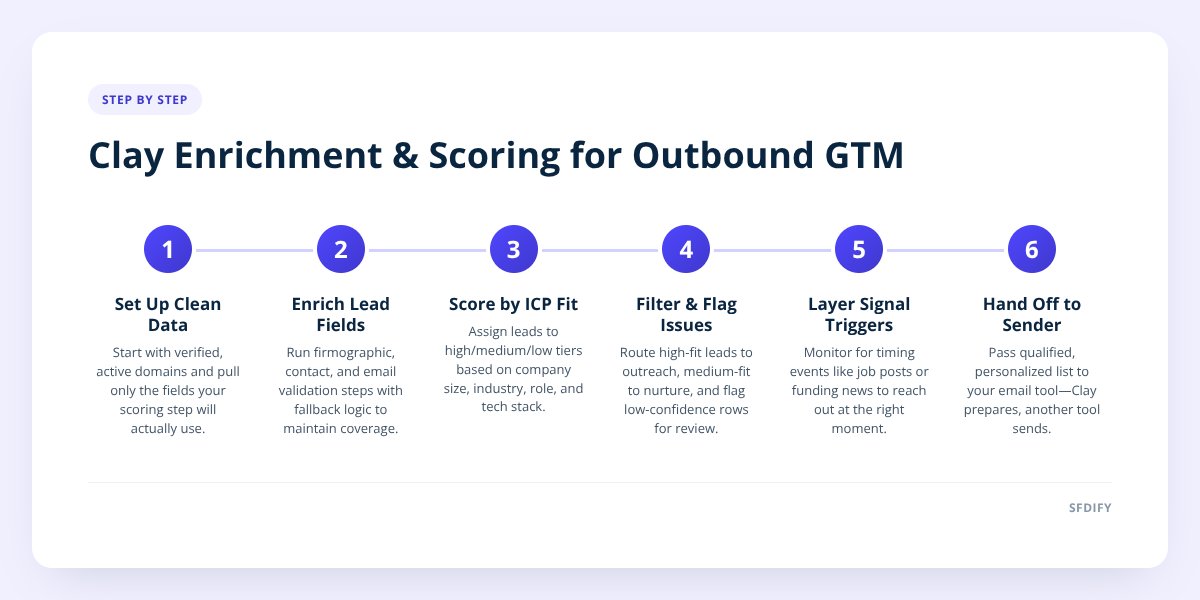
1. What does Clay actually do in a GTM stack?
Clay sits between your raw lead sources and your outreach tool, cleaning and enriching data before a single message goes out. It is not a CRM and it is not a sender — think of it as the workbench where a messy list of companies or contacts becomes a qualified, personalized one.
A typical table starts with something simple: a list of company domains or a saved search from a data provider. From there, Clay runs each row through a chain of enrichment steps — finding the right contact, pulling firm data, checking for signals, writing a personalized line — and the row comes out the other end ready for outreach.
What makes it different from a plain spreadsheet with some API calls bolted on is the waterfall logic: if one data provider doesn't return a result, the workflow automatically tries the next one, so coverage stays high without manual rechecking row by row. That waterfall is the piece most people underestimate until they've tried to replicate it by hand.
We cover the broader role this kind of work plays in a GTM function in What Is a GTM Engineer, and What Do They Actually Build? — Clay is one tool a GTM engineer uses, not the whole job.
2. How do we set up enrichment before anyone touches outreach?
We start every table with a clean source list and a defined set of fields we actually need, not every field a provider offers. Pulling 40 data points per lead when you only act on six slows the table down and adds noise.
Our enrichment sequence generally looks like this:
- Verify the domain and company are real and active before spending enrichment credits on it.
- Pull firmographic data — headcount, industry, tech stack — to confirm basic fit.
- Find the right person at the company, not just any employee, based on title and seniority.
- Validate the email address so the list doesn't bounce once it reaches a sending tool.
- Flag missing or low-confidence rows for manual review instead of pushing them forward blind.
That last step matters more than it sounds. A workflow that silently drops bad rows looks clean, but it quietly shrinks your addressable list. A workflow that flags them lets you decide whether to fix, skip, or deprioritize.
enrich only the fields your scoring step actually uses — anything else is cost and clutter, not signal.
3. How does ICP scoring actually work in Clay?
ICP scoring means assigning each enriched lead a number or tier based on how closely it matches your ideal customer profile, and Clay does this with formula columns or AI-scoring steps rather than a separate tool. The scoring criteria come first — company size, industry, tech stack, role seniority — and the enrichment data you pulled in step two feeds directly into them.
We weight criteria instead of treating them as pass/fail. A company that matches on size and industry but has the wrong title as the only contact might score as "medium" rather than getting discarded outright, because a follow-up enrichment step can sometimes find a better contact at the same company.
The output is a tier, not a yes/no: high-fit leads go straight to outreach, medium-fit leads get a lighter-touch sequence or go into a nurture list, and low-fit leads get filtered out before they ever reach a human or a sending tool. This is the step that separates Clay from a plain list-buying service — a vendor sells you rows; scoring tells you which rows are worth a rep's time.
if headcount in [10,200]
  and industry matches ICP list
  and contact title in [founder, VP, director]
then score = "high"
else if 2 of 3 match
  then score = "medium"
else score = "low"
4. What is signal-based prospecting, and why does it beat static lists?
Signal-based prospecting means triggering outreach off a recent, timed event — a job posting, a funding announcement, a leadership change — instead of working a static list that never updates. A static list tells you a company fits your ICP in general. A signal tells you this is a reasonable moment to reach out.
Clay connects to signal sources — job boards, news feeds, hiring platforms, technology trackers — and can watch a list continuously, adding a row or flag when something changes. For a product like our trucking TMS, Yolda, a relevant signal might be a carrier posting for a dispatcher or safety coordinator, since that often means they're reassessing their operations software around the same time.
The practical difference shows up in response behavior more than in any number we'd publish: a message that references something true and current ("saw you're hiring a safety manager") reads as research, while the same message sent cold off a static list reads as a template. We don't score our own outbound results publicly, but the logic holds regardless of the product — timing context changes how a message lands, full stop.
5. How do enrichment and scoring actually connect to outreach?
They connect through a clean handoff — Clay prepares the row, and a separate tool sends the message, with the two staying in sync on status. Clay is not built to be your sending or sequencing platform, and we don't treat it as one.
Here's how the stages typically compare in a Clay-centered workflow:
| Stage | Tool's job | What moves to the next stage |
|---|---|---|
| Sourcing | Pull raw company/contact list | Domains or names, unverified |
| Enrichment | Fill in firm, contact, and signal data | Rows with validated emails and context |
| Scoring | Tier each row against ICP criteria | High and medium-fit rows only |
| Personalization | Generate a tailored opening line per row | Rows with message copy attached |
| Outreach | Send, sequence, and track replies | Reply data synced back to the table |
The sync-back step at the end is easy to skip and shouldn't be. Without it, your enrichment table goes stale the moment a lead replies or unsubscribes, and you risk re-enriching or re-contacting someone who already responded.
6. How does running this ourselves change how we build it for clients?
Running these workflows on our own outbound means we've hit the same failure points a client would — bad waterfall order, scoring criteria that were too loose, signals that sounded good but didn't correlate with reply quality — before we ever design one for someone else. That's a different starting point than designing a workflow on paper and hoping it holds up in production.
It also means we're honest about what Clay can and can't do inside a GTM stack. It doesn't replace a CRM, it doesn't replace a sending tool, and it won't fix a poorly defined ICP — it just executes against whatever fit criteria you give it, faster and more consistently than someone doing it in a spreadsheet by hand. We covered the hiring side of this — what to expect from an outside team building these workflows for you — in Working With a Clay Agency: What to Expect, and the broader build-vs-buy decision in GTM Agency vs In-House vs Freelancer: Who Should Build.
If you're deciding whether to build a Clay-based GTM workflow in-house, hire it out, or bring someone in to set up the first version, our GTM engineering work covers Clay workflows, enrichment, ICP scoring, and signal-based prospecting end to end.
SFDIFY builds the same kind of enrichment and outbound systems for clients that we run on our own product pipeline. If you want a second opinion on your current setup or a workflow built from scratch, start a project at sfdify.com/contact — the first consultation is free.
Checklist: Setting up a Clay-based GTM workflow
- Define your ICP criteria in writing before building any table.
- Pick a clean source list — verified domains or a reputable data provider export.
- Build the enrichment waterfall with two or more providers per field.
- Limit enriched fields to only what your scoring step will use.
- Set up weighted ICP scoring with clear high, medium, and low tiers.
- Add at least one signal source relevant to your product's buying triggers.
- Flag low-confidence rows for manual review instead of auto-discarding them.
- Connect Clay to your sending tool with a two-way status sync.
- Review reply and bounce data monthly and adjust scoring weights accordingly.
Checklist: Setting up a Clay-based GTM workflow
- Define your ICP criteria in writing before building any table.
- Pick a clean source list — verified domains or a reputable data provider export.
- Build the enrichment waterfall with two or more providers per field.
- Limit enriched fields to only what your scoring step will use.
- Set up weighted ICP scoring with clear high, medium, and low tiers.
- Add at least one signal source relevant to your product's buying triggers.
- Flag low-confidence rows for manual review instead of auto-discarding them.
- Connect Clay to your sending tool with a two-way status sync.
- Review reply and bounce data monthly and adjust scoring weights accordingly.