 SFDIFY
- Define one ICP and one target list before the first conversation.
- Gather your current CRM and sequencer access details.
- List any data providers you already pay for, to avoid duplicate costs.
We build outbound workflows in Clay for our own products before we ever build one for a client. That order matters: it means the advice below comes from running these tables ourselves, not from a sales deck. A Clay engagement should produce something you can open, inspect, and run without the agency in the room — anything short of that is a demo wearing a deliverable's clothes.
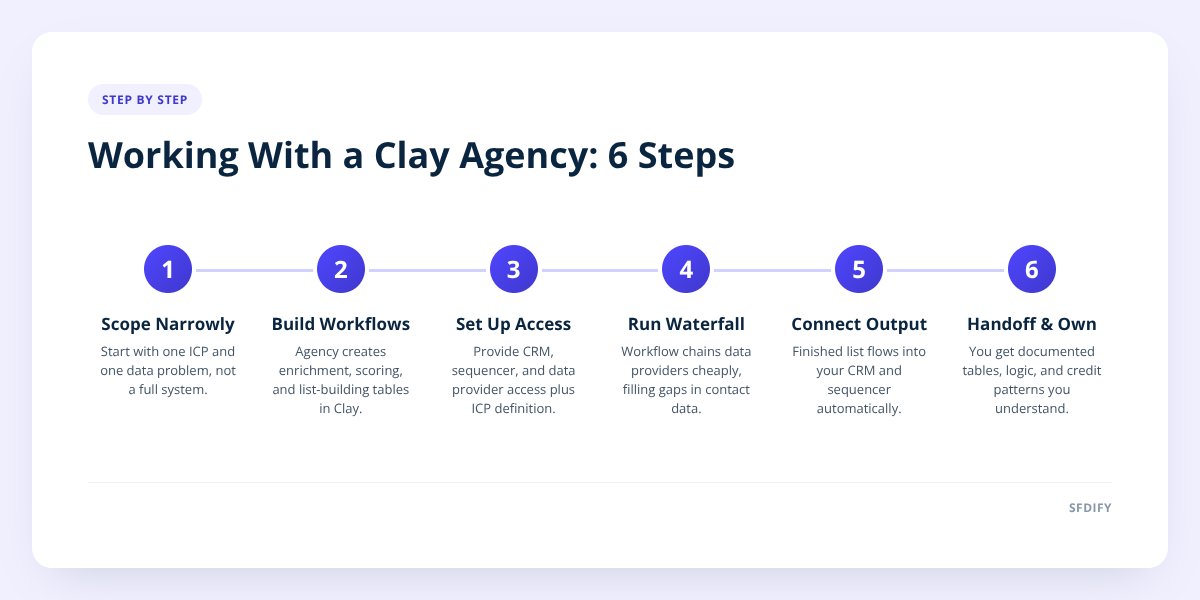
A Clay agency builds and maintains data enrichment, scoring, and list-building workflows inside Clay, then connects them to your CRM and sequencer so qualified leads flow into outbound automatically. A real engagement ends with tables you own, documented logic, and a credit usage pattern you understand — not just a one-time list export. Scope the first project narrowly (one ICP, one data problem) before asking for anything broader.
- Clay is a data workspace that pulls from multiple providers in a waterfall — trying one source, falling back to the next if the first comes up empty — rather than relying on a single enrichment vendor.
- A finished workflow includes documentation of what each column does, where the data comes from, and what happens when a lookup fails; a demo only shows the happy path.
- Credit and tooling costs are usage-based and tied to API calls to third-party data providers, so the agency's job includes managing waterfall order to avoid paying for an expensive lookup when a cheap one would do.
- The workflow's output is only useful once it lands in your CRM and sequencer in the right shape — a list sitting in Clay that nobody routes anywhere isn't pipeline, it's a spreadsheet.
1. What does a Clay agency actually build?
A Clay agency builds tables that take a raw list of companies or contacts and turn them into a scored, enriched, sequence-ready list. The core jobs are enrichment (filling in firmographic and contact data), waterfall lookups (chaining data providers so a missing email or phone number gets a second and third chance), scoring (ranking records against your ideal customer profile), and formatting output for your CRM and sequencer.
Here's a simplified version of what a waterfall step looks like in practice:
1. Try Provider A for verified email
2. If empty, try Provider B
3. If still empty, try a domain-pattern guess
4. Flag "no email found" if all three fail
5. Pass result to the next column (title match)
We run this exact kind of chained lookup on our own outbound, enriching leads for our own products before any of them hit a sequencer. The agency's value isn't knowing that Clay exists — it's knowing which providers to chain, in what order, and when to stop paying for a lookup that isn't converting into usable data.
2. How do you scope a first Clay project?
Scope the first project to one audience and one clear output, not a full outbound system. A good first scope answers three questions: who is the target list (one ICP, not five), what does "enriched and scored" mean for that list, and where does the finished list need to land.
Trying to scope everything at once — multiple ICPs, multiple data sources, a full scoring model, and CRM sync — in a first engagement is how projects stall. A narrower first build gives you something to evaluate before committing further.
A workable first scope looks like:
- One target list with a defined source (a CSV, a CRM segment, or a sales nav export)
- One enrichment goal (verified email and phone, or firmographic fields like employee count and tech stack)
- One scoring rule set (even a simple one: fit score plus one or two intent signals)
- One destination (your CRM, a sequencer, or both)
if you can't describe the first deliverable in one sentence, the scope is too wide.
Once that first table works end to end, expanding to more ICPs or more complex scoring is a much smaller lift than starting broad. This is the same reasoning we use when scoping any engineering project — we wrote about applying it to software builds in How to Scope an MVP Without Building the Whole Product.
3. What access and data does the agency need from you?
The agency needs read access to your existing lead data, admin-level access to connect Clay to your CRM and sequencer, and clarity on your ICP — vague access requests or a vague ICP are the two most common reasons a first project slips.
| What they need | Why |
|---|---|
| CRM access (API key or app connection) | To read existing records and write enriched ones back without duplicates |
| Sequencer access | To push qualified leads into outreach steps automatically |
| Current lead or account list | To test enrichment and scoring against real data, not samples |
| ICP definition | To build scoring logic — industry, size, role, signals that matter |
| List of data providers you already pay for | To avoid paying twice for the same enrichment source |
| A point of contact who knows the sales process | To validate that scored leads actually match what reps want |
If you don't have a documented ICP yet, say so up front. A Clay agency can help translate loose criteria ("companies that feel like a good fit") into testable rules, but that's a conversation to have before the build starts, not a gap to discover halfway through.
4. How do credits and tooling costs actually work?
Clay and its connected data providers charge per lookup, so your cost scales with how many records you enrich and how many providers each record has to pass through in the waterfall. This is different from a flat software subscription — a table that enriches 500 records costs less than one enriching 50,000, and a waterfall that tries three providers per record costs more than one that stops after the first match.
The practical implication: an agency managing costs well will order the waterfall cheapest-to-most-expensive, cap retries on records that are unlikely to resolve, and avoid running expensive lookups (like deep intent data) on records that fail basic firmographic fit first. Ask any agency you're evaluating to explain their waterfall ordering logic — if they can't, cost control probably isn't built into the workflow.
We don't publish numbers for our own outbound spend, and any agency quoting you a flat "per lead" price should be able to explain what's included in that number and what happens when volume changes month to month.
5. How do Clay tables connect to the CRM and sequencer?
The connection works through API sync or native integrations that push enriched, scored records from Clay directly into CRM fields and sequencer steps, so reps and automated sequences see the same data without manual export. A table sitting in Clay, however well enriched, does nothing until it's wired into the tools your team actually works in.
In practice this means:
- Clay writes enriched fields (verified email, title, score) back to matching CRM records, or creates new ones
- Scoring tiers determine routing — a high-fit score might trigger a Salesforce task or a sequencer enrollment, a low-fit score might just update a field for later review
- Sequencer enrollment is usually conditional, not automatic for every record, so unqualified leads don't burn outreach steps
If your CRM is Salesforce, this sync needs to respect your existing field structure and automation rules, which is closer to a Salesforce consulting conversation than a pure data problem — something we cover in What to Expect During a Salesforce Implementation Project. If you're still deciding on a CRM at all, that decision affects what a Clay build can plug into later, which we also wrote about in CRM Selection: Custom, Salesforce, or Off-the-Shelf.
6. How do you tell a finished workflow from a demo?
A finished workflow runs without the agency present, handles failure cases, and is documented well enough that someone new to Clay could explain what each table does. A demo shows clean data flowing through a happy path and stops there.
Concrete signs you're looking at a finished deliverable rather than a demo:
- You can open the table and see notes or a readme explaining each column's purpose
- Failed lookups are flagged, not silently dropped
- The workflow has been tested against messy real data, not just a curated sample list
- You know exactly what happens when a record doesn't match any waterfall provider
- Someone on your team, not just the agency, can make a small edit (like adjusting a scoring threshold) without breaking the table
- The output already lands in your CRM and sequencer — you're not manually exporting a CSV each time
If an agency hands you a one-time list and calls it done, that's a list, not a workflow. The difference matters because outbound data decays — contacts change roles, companies get acquired, emails bounce — so a workflow needs to be something you or the agency can re-run and maintain, not a single snapshot.
Checklist: Scoping and evaluating a Clay agency engagement
- Define one ICP and one target list before the first conversation.
- Gather your current CRM and sequencer access details.
- List any data providers you already pay for, to avoid duplicate costs.
- Ask the agency to explain their waterfall ordering and how they control credit spend.
- Confirm what "finished" means in writing — documentation, failure handling, and ownership.
- Test the delivered table against a messy sample, not just a clean one.
- Verify the output syncs into your CRM and sequencer, not just a spreadsheet.
- Ask who can edit the workflow after the engagement ends.
How this shapes the way we build
We treat Clay work the same way we treat software builds: scope narrow first, document everything, and hand over something that works without us standing next to it. If you're weighing whether this should be an in-house hire, a freelancer, or an agency engagement, we laid out that decision in GTM Agency vs In-House vs Freelancer: Who Should Build. If you want more on what the role itself covers day to day, see What Is a GTM Engineer, and What Do They Actually Build?
If you're ready to scope a first Clay project, start a project with SFDIFY or read more about our GTM engineering work.
Checklist: Scoping and evaluating a Clay agency engagement
- Define one ICP and one target list before the first conversation.
- Gather your current CRM and sequencer access details.
- List any data providers you already pay for, to avoid duplicate costs.
- Ask the agency to explain their waterfall ordering and how they control credit spend.
- Confirm what "finished" means in writing — documentation, failure handling, and ownership.
- Test the delivered table against a messy sample, not just a clean one.
- Verify the output syncs into your CRM and sequencer, not just a spreadsheet.
- Ask who can edit the workflow after the engagement ends.