 SFDIFY
- Count the configuration and bug-fix requests your team submitted in the last 30 days.
- List every Salesforce cloud and external system currently integrated with your org.
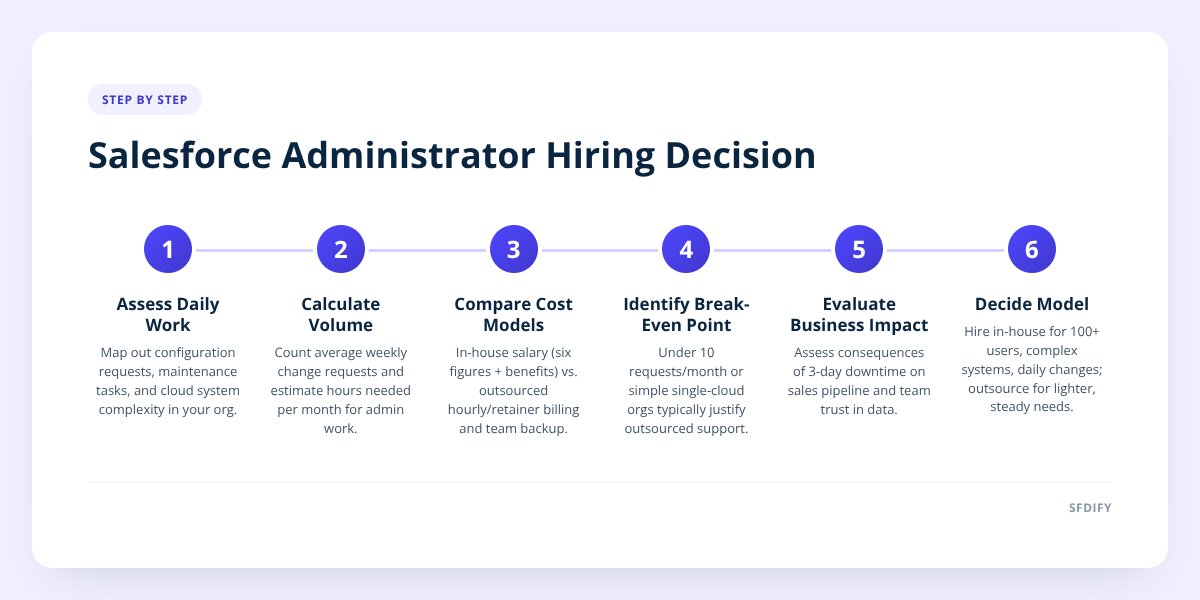
- Estimate the cost of a three-day delay if something breaks and sits unfixed.
Hire an in-house Salesforce administrator once you have enough ongoing configuration work to fill 30+ hours a week — usually north of 100 users or multiple integrated systems feeding your org. Below that, an outsourced admin or a consulting partner costs less and gets issues fixed faster, because you're paying for hours used, not a seat that sits empty between projects.
- A full-time Salesforce administrator in the US typically commands a salary in the six-figure range once benefits and overhead are included — before any backup coverage for vacation or turnover.
- Outsourced admin support is usually billed hourly or as a monthly retainer, so a company with light ongoing needs pays only for the hours actually used.
- The break-even point is less about company size and more about ticket volume: if your team submits fewer than 10 configuration requests a month, a full-time hire sits idle much of the time.
- Salesforce's own Trailhead certification paths (Administrator, Advanced Administrator, Platform App Builder) describe the same skill set regardless of who holds the role — the question is how many hours of it you need each week.
1. What does a Salesforce administrator actually do day to day?
A Salesforce administrator spends most of their week on configuration, not strategy: building and editing fields, flows, page layouts, validation rules, reports, and permission sets. They also handle the unglamorous but critical work of user management — adding and deactivating licenses, resetting access, and keeping profiles aligned with who actually works there.
A typical week looks like this:
- Fixing a broken flow after a sales rep reports a field not updating correctly.
- Building a new report or dashboard a sales manager asked for last Tuesday.
- Reviewing and cleaning up duplicate records that slipped past existing rules.
- Managing the next seasonal release — testing what Salesforce's release notes say will change before it hits production.
- Fielding one-off requests: "can we add a dropdown here," "can this field be required," "why did this automation fire twice."
None of this is small. It's also rarely full-time strategic work — it's maintenance, and maintenance scales with your user count and the complexity of your automations, not with your revenue.
2. In-house vs. outsourced: how do the real costs compare?
| In-house admin | Outsourced admin / consulting | |
|---|---|---|
| Best for | 100+ users, complex multi-cloud orgs, daily change requests | Under 100 users, steady but not constant configuration needs |
| Cost structure | Fixed salary plus benefits, regardless of workload | Hourly or monthly retainer, scales with actual usage |
| Coverage | Vulnerable to vacation, turnover, and single-point-of-failure risk | Backed by a team, so work continues if one person is out |
| Ramp-up time | Weeks to recruit, interview, and onboard | Can typically start within days of a signed agreement |
| Depth of expertise | One person's accumulated knowledge of your org | Access to specialists across clouds (Sales, Service, CPQ) as needed |
Our take: if you're adding or changing automations weekly, running integrations with other systems, and have more than 100 licensed users, hire in-house. The ongoing volume of work justifies a dedicated salary, and an in-house admin builds institutional knowledge of your org that's hard to replicate externally.
If your requests are steadier but lighter — a flow tweak here, a new report there, a quarterly release review — outsourcing to a consulting partner like SFDIFY's Salesforce consulting team is the more rational spend. You get certified expertise without paying a full salary for idle hours.
if your team submits fewer than 10 Salesforce change requests a month, you don't need a full-time admin — you need a reliable partner you can call when something breaks.
3. What's the actual tipping point between the two?
The tipping point is ticket volume and system complexity, not headcount or revenue. A 40-person sales team running a single Sales Cloud instance with simple automations can often run on 10-15 hours of outsourced admin support a month. A 40-person team running Sales Cloud, Service Cloud, and three external integrations through middleware needs someone watching the org daily — that's a full-time job regardless of how small the company is.
Ask three questions before deciding:
- How many configuration or bug-fix requests land per week, on average?
- How many separate Salesforce clouds or external systems feed into this org?
- What happens to your pipeline or support queue if a broken flow sits unfixed for three days?
If the answer to the third question is "nothing bad happens," outsourced support covers you. If it's "deals stall and reps stop trusting the data," you need someone watching it full-time or close to it.
This is the same logic we laid out when comparing build paths in CRM Selection: Custom, Salesforce, or Off-the-Shelf — the right choice tracks your actual usage pattern, not a rule of thumb based on company size alone.
4. Does a Salesforce administrator need to be certified?
Not legally, but certification is the standard way to verify baseline competence, and Salesforce documents the exact skills each level covers. The Salesforce Certified Administrator credential, per Salesforce's own Trailhead certification guide, covers security, data management, workflow automation, and reporting — the core of the job described above. The Advanced Administrator and Platform App Builder certifications go further into complex automation and custom app design.
When you outsource, ask directly which certifications the person doing the work holds, and confirm they've worked in your specific cloud — Sales Cloud experience doesn't automatically transfer to Service Cloud or CPQ configuration. When hiring in-house, the same certifications apply, but you're also betting on a single person's range of exposure, since one admin can't have hands-on experience in every cloud your org might eventually need.
Admin cert path (Salesforce Trailhead):

1. Administrator — core config, security, data
2. Advanced Administrator — complex automation
3. Platform App Builder — custom app design
5. Can AI or automation reduce how much admin time you need?
Yes, but only for a specific slice of the work — not all of it. Flow automation and validation rules already cover a lot of routine data entry, and layering AI on top can extend that further, particularly for tasks like summarizing case notes, routing leads, or flagging records that need review. We cover how to decide what's worth automating versus what still needs a human in Salesforce Automation vs. AI: A 5-Step Decision Guide.
What AI doesn't replace is the judgment calls: deciding whether a new field belongs on a page layout, resolving a permission conflict between two departments, or catching that a "simple" request will break three existing flows if implemented as asked. That's still admin work, done by a person who understands your org's history — whether that person sits on your payroll or on a consulting partner's team.
Checklist: deciding how to staff your Salesforce admin work
- Count the configuration and bug-fix requests your team submitted in the last 30 days.
- List every Salesforce cloud and external system currently integrated with your org.
- Estimate the cost of a three-day delay if something breaks and sits unfixed.
- Check whether any current staff already hold a Salesforce Administrator certification.
- Request a sample scope of work from an outsourced provider before committing to in-house hiring.
- Compare the fully loaded cost of a salaried hire against a 12-month retainer estimate.
- Revisit this decision any time you add a new cloud, integration, or 25+ new users.
How this shapes the way we staff Salesforce work for clients
We built our own products the same way we recommend clients staff Salesforce: match the people to the actual volume of work, not a fixed headcount assumption. For clients with steady but moderate configuration needs, we provide ongoing Salesforce consulting support rather than pushing a full-time hire they don't need yet. For clients scaling past that point, we help them build the case — and the job description — for an in-house administrator who can grow with the org.
If you're trying to figure out which side of that line you're on, start a project with SFDIFY and we'll walk through your current ticket volume, cloud footprint, and what a realistic staffing plan looks like for the next year.
Checklist: deciding how to staff your Salesforce admin work
- Count the configuration and bug-fix requests your team submitted in the last 30 days.
- List every Salesforce cloud and external system currently integrated with your org.
- Estimate the cost of a three-day delay if something breaks and sits unfixed.
- Check whether any current staff already hold a Salesforce Administrator certification.
- Request a sample scope of work from an outsourced provider before committing to in-house hiring.
- Compare the fully loaded cost of a salaried hire against a 12-month retainer estimate.
- Revisit this decision any time you add a new cloud, integration, or 25+ new users.