 SFDIFY
- List the fields the new data needs and check whether they fit on an existing standard object.
- Identify the relationship type — one-to-one, one-to-many, or many-to-many — before choosing field vs. object.
- Confirm whether the data needs its own approval process or lifecycle independent of Opportunity or Case.
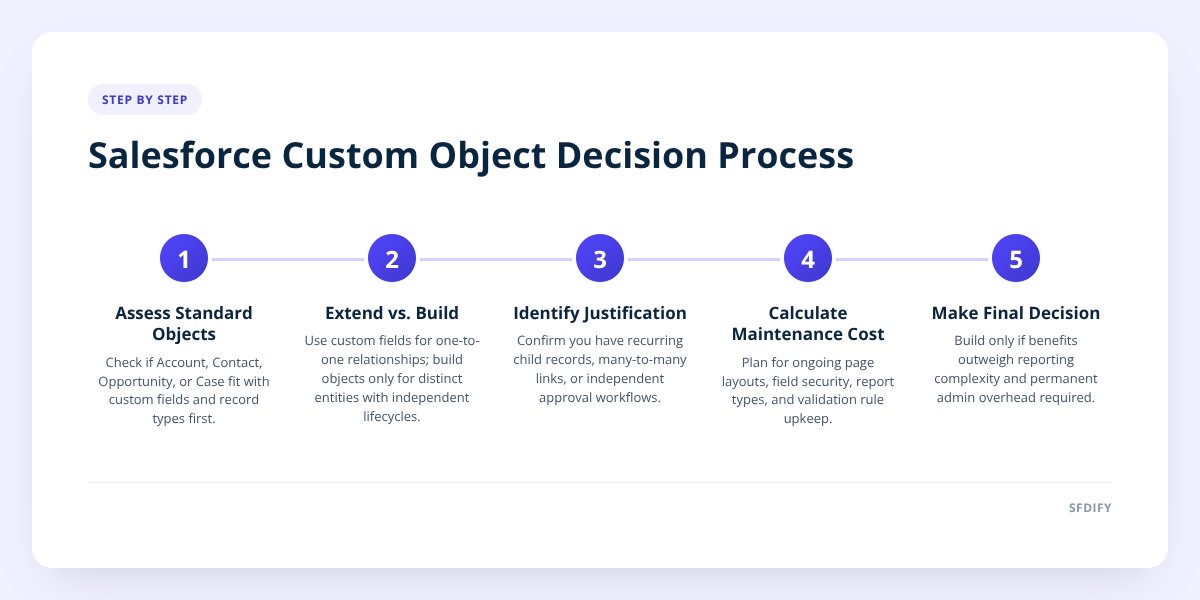
Build a custom object only when a standard Salesforce object (Account, Contact, Opportunity, Case) can't represent the data even after adding fields and record types. If the thing you're tracking is really a variation of an existing object, extend that object instead — a new custom object adds a permanent cost in reporting complexity, page layouts, and automation that has to be maintained for as long as the org exists. Most teams reach for custom objects too early and end up with a data model nobody fully understands two years later.
- Standard objects like Account, Contact, Opportunity, and Case cover the majority of CRM use cases when extended with custom fields and record types.
- A custom object makes sense when you need a genuinely new relationship — a many-to-many link, a recurring child record, or an entity with its own lifecycle and approval process.
- Every custom object adds ongoing maintenance: page layouts, field-level security, sharing rules, and report types that someone has to keep current.
- If the data doesn't need to live inside Salesforce's sales or service process, a separate system — not a custom object — is often the better fit.
1. What's the difference between a standard and a custom object?
A standard object is one Salesforce ships with and manages — Account, Contact, Opportunity, Lead, and Case are the core ones. A custom object is one you create yourself, with its own fields, relationships, and permissions, to store data Salesforce doesn't model out of the box.
Standard objects come with built-in behavior: Opportunities roll up to forecasts, Cases feed into service metrics, Contacts link automatically to Accounts. Custom objects get none of that for free. You define every field, every relationship, every page layout, and every report type from scratch.
That's not a reason to avoid them — plenty of real business processes genuinely don't fit a standard object. But it means a custom object is never "free" the way adding a field to Contact is. You're taking on a small piece of ongoing system design each time you create one.
2. When should you extend a standard object instead of building new?
Extend a standard object when the data you're adding describes something that's still fundamentally a Contact, Account, or Opportunity — just with more detail. Custom fields and record types go a long way before you need a new object at all.
Examples of extension rather than creation:
| Situation | Extend standard object with... |
|---|---|
| Tracking contract renewal dates | Custom field on Opportunity or Account |
| Different sales processes for two product lines | Record types + page layouts on Opportunity |
| Flagging VIP accounts | Checkbox or picklist field on Account |
| Logging a support ticket's root cause | Custom fields on Case |
The test we use with clients: if the new data has a one-to-one relationship with an existing record and doesn't need its own list view, its own approval process, or its own set of child records, it's a field — not an object. We cover this same decision from the CRM-choice angle in CRM Selection: Custom, Salesforce, or Off-the-Shelf, which is worth reading if you're still choosing a platform at all.
3. When does a custom object actually earn its keep?
Build a custom object when you have a distinct entity with its own identity, lifecycle, or many-to-many relationships that standard objects can't express. Three patterns justify it almost every time:
- A recurring child record tied to a parent. Equipment units under an Account, each with its own warranty date and service history.
- A many-to-many relationship. Multiple Contacts serving on multiple Committees, where neither side is a natural "child" of the other.
- An entity with its own approval workflow. A Change Request object that moves through Draft, Review, and Approved stages independent of any Opportunity or Case.
A concrete example from our own work: when we built custom CRM functionality for a client who needed to track equipment inspections tied to specific assets, we created a custom object rather than overloading Case, because inspections had their own recurring schedule, their own approval step, and needed to roll up to an Asset record that didn't map cleanly to any standard object. That's the kind of structural mismatch that justifies the overhead.
if you can describe the new data as "a kind of" an existing record, extend that object; if you can only describe it as "a thing that relates to" multiple records, build a custom object.
4. What does a custom object cost you in reporting and maintenance?
Every custom object you add multiplies the number of report types, page layouts, and sharing rules someone has to maintain going forward. This is the cost people underestimate most.
Standard objects come with prebuilt report types — "Opportunities with Products," "Cases with Contacts" — ready to use. Custom objects need custom report types built manually, and if you later add a related object, you often need a new report type for every combination. A data model with eight custom objects can easily need thirty or more report types to answer basic questions.
Maintenance compounds the same way:
- Page layouts need updating every time a field is added or a process changes.
- Field-level security has to be set per profile, per object, every time.
- Sharing rules multiply when custom objects relate to each other in non-obvious ways.
- Validation rules and flows built against custom objects break quietly when someone renames a field.
None of this means don't build — it means budget for an admin, whether in-house or outsourced, who actually owns the data model. We walk through that staffing decision in Hire a Salesforce Administrator: In-House or Outsourced. A Salesforce org with twenty custom objects and no dedicated owner is one of the most common messes we get called in to untangle.
5. When is a separate system better than a Salesforce custom object?
Choose a separate system when the data has its own lifecycle that doesn't depend on your sales or service process, needs to scale independently, or belongs to a domain Salesforce wasn't built for. Not everything your business tracks belongs inside the CRM just because Salesforce can technically hold it.
Signs you're forcing data into Salesforce that should live elsewhere:
- The data updates far more often than your CRM records — high-frequency events, sensor readings, or transaction logs.
- The data needs its own compliance or security boundary separate from your sales data.
- You're building what amounts to a full application — scheduling, document generation, a customer-facing portal — inside custom objects and Visualforce or Lightning components.
- Storage costs are climbing because you're storing large volumes of operational data that don't need to sit in your CRM's data model.
We see this pattern often with logistics and operations data. Our own product Yolda, an AI-native transportation management system, exists because dispatch, safety compliance, and driver documents are domains that need their own purpose-built data model, workflows, and mobile app — not a set of custom objects bolted onto a CRM. When a client's "CRM" starts accumulating objects for inventory, scheduling, or document workflows that have nothing to do with selling or servicing customers, that's usually the signal to scope a standalone system instead.
If you're not sure which side of that line you're on, Build a Business Case for Custom Software walks through how to evaluate that tradeoff with real numbers.
How this shapes the way we build
When SFDIFY scopes Salesforce work, we map the data model before we touch configuration — which entities are genuinely new, which are variations of something standard, and which don't belong in Salesforce at all. That sequencing is what keeps an org reportable and maintainable three years out instead of becoming a pile of unused custom objects nobody wants to clean up. If you're weighing a new object, a data model cleanup, or whether Salesforce is even the right home for a process, our Salesforce consulting work starts with a free first consultation.
Start a project at sfdify.com/contact or reach us at info@sfdify.com.
Checklist: deciding whether to build a custom object
- List the fields the new data needs and check whether they fit on an existing standard object.
- Identify the relationship type — one-to-one, one-to-many, or many-to-many — before choosing field vs. object.
- Confirm whether the data needs its own approval process or lifecycle independent of Opportunity or Case.
- Estimate the report types you'll need to add if you create the object.
- Assign an owner — in-house admin or outsourced partner — responsible for maintaining the object long-term.
- Check update frequency; high-frequency operational data may belong in a separate system.
- Review existing custom objects for overlap before adding a new one.
- Document the decision so the next admin understands why the object exists.
Checklist: deciding whether to build a custom object
- List the fields the new data needs and check whether they fit on an existing standard object.
- Identify the relationship type — one-to-one, one-to-many, or many-to-many — before choosing field vs. object.
- Confirm whether the data needs its own approval process or lifecycle independent of Opportunity or Case.
- Estimate the report types you'll need to add if you create the object.
- Assign an owner — in-house admin or outsourced partner — responsible for maintaining the object long-term.
- Check update frequency; high-frequency operational data may belong in a separate system.
- Review existing custom objects for overlap before adding a new one.
- Document the decision so the next admin understands why the object exists.