 SFDIFY
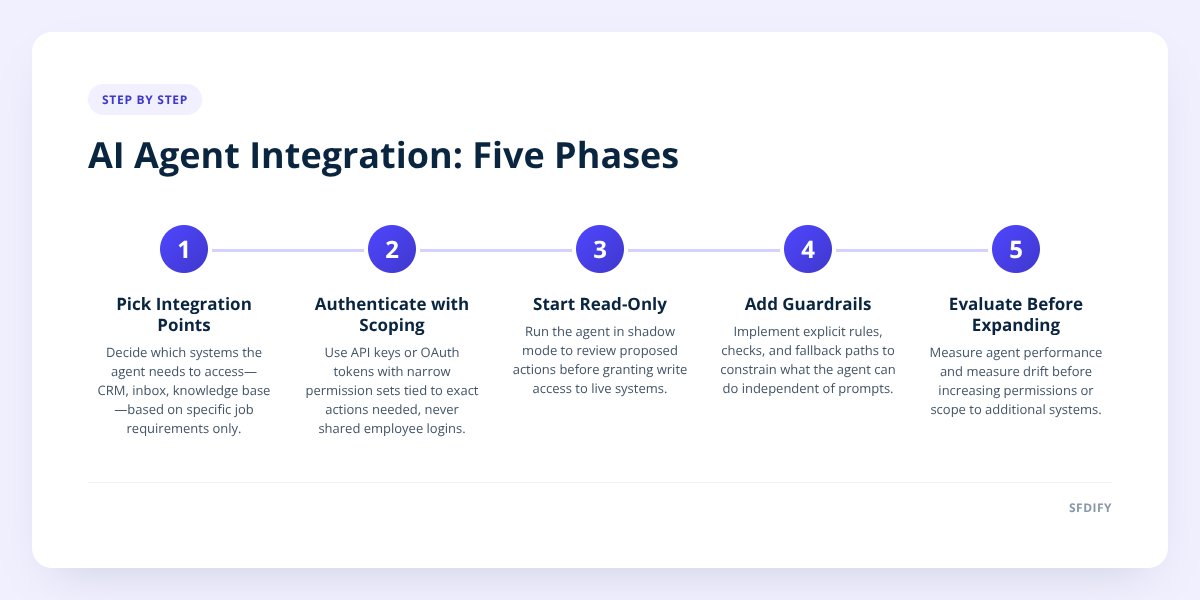
- List every system the agent needs to touch and mark each as read, write, or both.
- Create a scoped API connection or OAuth token for each system, never a shared login.
- Start every new connection in read-only mode before granting any write access.
AI agent integration means connecting a language model to your real systems, your CRM, your inbox, your data, through APIs, with scoped permissions and guardrails that stop it from doing something you didn't approve. The work has five phases: pick the integration points, authenticate with scoped access, give the agent read access before write access, add guardrails and human checkpoints, and evaluate before you expand its reach. Most failed rollouts skip straight to write access without the middle steps.
- Scoped API access, not a shared login, is how a properly wired agent reaches your CRM, inbox or help desk; it should hold only the permissions it needs for its job.
- Read-only access should come before write access in every rollout, so you can watch what the agent would do before it can actually do it.
- Meta's official API is the only supported way to automate Instagram DMs at scale; tools like MuChat are built directly on it rather than on scraping or unofficial workarounds.
- An agent without an evaluation step is a liability, not a tool, because you have no way to measure if it's getting better or quietly getting worse.
1. What systems does an AI agent actually need to connect to?
An agent needs access to the specific tools it has to act on, nothing more. For a sales or support agent, that usually means your CRM (Salesforce, HubSpot, or a custom build), your inbox or shared helpdesk, and whatever data source holds the facts it needs to answer questions correctly, a knowledge base, a product catalog, or order history.
Each connection point is a separate decision, not a bundle. You might give an agent read access to your CRM's contact records so it can personalize replies, but no access at all to your finance system. The question to ask for every system on the list: does this agent need to read from it, write to it, or both?
A common mistake is connecting everything at once because the API keys are easy to generate. That creates a much bigger attack surface and a much harder debugging problem when something goes wrong. We generally recommend starting with one inbox or one CRM object type, proving it works, then expanding.
This is also where the choice of agent matters less than the choice of connection. If you haven't yet decided which agent to deploy first, that's a separate question we cover in AI Agents for Sales and Support: What to Deploy First. This post assumes you've picked one and need to wire it in.
2. How does authentication and permission scoping actually work?
The agent should authenticate through an API key or OAuth token scoped to exactly the actions it needs, never through a shared employee login. Most modern CRMs and inboxes support this natively. Salesforce has named connected apps with field-level permission sets. Gmail and Outlook support OAuth scopes that can be limited to specific folders or labels. Instagram's official Graph API issues access tokens tied to a specific business account with defined permission categories.
The scoping decision usually breaks down like this:
| Access level | What it allows | When to use it |
|---|---|---|
| Read-only | Agent can view records, messages, data | Always, during the first weeks of any rollout |
| Write-limited | Agent can create or update specific fields only | After read-only has run clean for a defined test period |
| Full write | Agent can create, update, delete across the connected object | Rare, usually reserved for narrow, well-tested workflows |
| Action-triggering | Agent can call external actions, send emails, book meetings | Only with a human-approval step in the loop, at least initially |
A connected app with a narrow permission set is harder to misuse even if the agent misbehaves or a prompt is manipulated. This is the same principle behind least-privilege access in any software system, applied to a system that's generating its own instructions in real time rather than running fixed code.
3. Why should you start the agent in read-only mode first?
Read-only mode lets you see exactly what the agent would do before it can do it, which is the only reliable way to catch mistakes before they reach a customer. In practice this means the agent drafts the CRM update, the reply, or the email, and a human or a logging system reviews it, rather than the agent executing the action directly.
Run the agent in this shadow mode for a defined period, log every proposed action, and review a sample by hand. Look specifically for:
- Cases where it pulled the wrong record or mismatched a contact
- Replies that were factually correct but tonally off
- Actions it proposed that were technically permitted but clearly wrong for the situation
- Any case where it couldn't tell the difference between a real request and an edge case
Only after this review period should you flip specific, narrow actions to live write access. Instagram DM automation is a good illustration of narrow scope done right. MuChat, our Instagram DM tool, runs comment-to-DM replies, story reply automation, email capture and sequenced follow-ups entirely on Meta's official Instagram API. It never guesses at message intent beyond the flow you build, and every action, a DM sent, an email captured, a tag applied, is scoped to the specific trigger that fired it. That's a useful pattern to copy: define the trigger, define the exact action, and don't let the agent improvise outside that boundary.
4. What guardrails actually stop an agent from doing something wrong?
Guardrails are explicit rules, checks, and fallback paths that constrain what the agent can do, independent of how well it was prompted. Prompting alone is not a guardrail, because a model's behavior under an unusual input is never fully predictable.
Practical guardrails we build into client systems include:
- Hard action limits. The agent cannot issue a refund over a set dollar amount, cannot delete a CRM record, cannot send an email to more than one recipient without approval.
- Confidence thresholds. If the model's retrieval step doesn't find a clear answer in your data, it hands off to a human instead of guessing.
- Escalation triggers. Specific keywords, sentiment signals, or repeated failed attempts route the conversation to a person automatically.
- Audit logging. Every action the agent takes is recorded with the input that triggered it, so you can trace back any mistake.
- Rate limits. The agent can only take a bounded number of actions per hour per customer, which limits damage from a feedback loop or malformed trigger.
if you can't explain in one sentence what stops your agent from taking a bad action, you don't have a guardrail, you have a hope.
5. How do you know if the agent is actually working?
You know by running a structured evaluation against real examples, not by watching it for a few days and deciding it feels fine. Evaluation means building a test set of realistic inputs, the kinds of messages or records the agent will actually see, with a known correct output, then scoring the agent's actual output against that set every time you change the prompt, the model, or a connected data source.
Evaluation set: 50-200 real examples
For each: input, expected action, actual action
Score: did it take the right action, cite the right data, stay in scope
Re-run after every prompt or model change
This step is the one most teams skip because it's not as visible as shipping the integration itself. But an agent that passed a demo and then went live without ongoing evaluation is the most common reason integrations get quietly turned off a few months later. We walk through this in more depth in Shipping AI Features: The 5 Checks We Run First, and if you're not yet sure an agent should go into production versus a smaller pilot, How to Pilot AI Before Full Integration: A 5-Step Plan covers that decision directly.
How this shapes the way we build
We treat integration as a sequence, not a single API call. Every engagement starts with mapping exactly which systems the agent touches, scoping permissions to the narrowest useful set, running a read-only shadow period, and building the evaluation set before the agent goes live, not after something breaks. SFDIFY is an OpenAI Select Partner, and we apply that same sequence whether the agent sits in front of Salesforce, a custom CRM, or a messaging channel like Instagram. If you want a second opinion on where your agent should plug in first, see our AI agents and chatbots work.
If you're ready to wire an agent into your own systems, start a project with SFDIFY or reach us at info@sfdify.com.
Checklist: Wiring an AI agent into your CRM and inbox
- List every system the agent needs to touch and mark each as read, write, or both.
- Create a scoped API connection or OAuth token for each system, never a shared login.
- Start every new connection in read-only mode before granting any write access.
- Log every proposed action during the shadow period and review a sample by hand.
- Set hard limits on dollar amounts, deletions, and recipient counts before going live.
- Build confidence thresholds that hand off to a human when the data is unclear.
- Add escalation triggers for sensitive keywords or repeated failures.
- Build a 50-200 example evaluation set with known correct outputs before launch.
- Re-run the evaluation every time you change the prompt, model, or data source.
- Review audit logs on a regular schedule, not only after something goes wrong.
Checklist: Wiring an AI agent into your CRM and inbox
- List every system the agent needs to touch and mark each as read, write, or both.
- Create a scoped API connection or OAuth token for each system, never a shared login.
- Start every new connection in read-only mode before granting any write access.
- Log every proposed action during the shadow period and review a sample by hand.
- Set hard limits on dollar amounts, deletions, and recipient counts before going live.
- Build confidence thresholds that hand off to a human when the data is unclear.
- Add escalation triggers for sensitive keywords or repeated failures.
- Build a 50-200 example evaluation set with known correct outputs before launch.
- Re-run the evaluation every time you change the prompt, model, or data source.
- Review audit logs on a regular schedule, not only after something goes wrong.