 SFDIFY
- Define the app's scope in one paragraph before contacting anyone.
- List the platforms you need — iOS, Android, web, or all three.
- Decide how often you expect to update the app after launch.
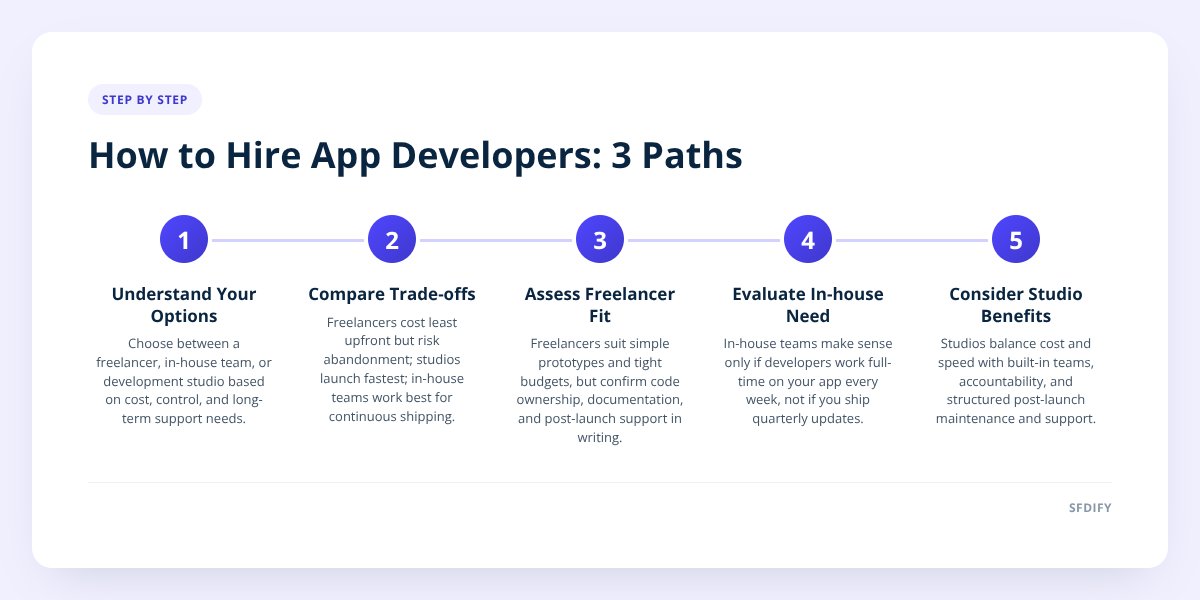
You have three real paths to a business app: a freelancer, an in-house team, or an app development studio like SFDIFY. A freelancer is the cheapest way to test an idea but carries the most risk once the app is live. An in-house team costs the most up front but gives you full control. A studio sits in between: faster than hiring, more accountable than a solo freelancer, and built to support the app after launch.
- A single freelancer typically charges less per hour than a studio team, but if they leave mid-project or after launch, you often start over with a new developer reading unfamiliar code.
- An in-house team means salaries, benefits, and management overhead that continue whether or not you're actively building — that only pays off if you're shipping updates constantly, not twice a year.
- A studio bills for a project or a retainer, brings a built-in team (design, backend, QA), and is structured to stay on for maintenance after launch.
- Before signing with anyone, ask who owns the source code, what happens if your main contact leaves, and what post-launch support costs — we cover the full list of questions in 8 Questions to Ask Before You Hire an App Developer.
1. What are the three ways to hire app developers?
The three paths are a freelancer, an in-house team, and an app development studio — each trades cost against control and long-term support differently. Most businesses default to whichever one they heard about first, which is usually the wrong reason to pick.
A freelancer is one person, usually found through a marketplace or referral, who builds the app largely solo. An in-house team means you hire developers, designers, and a project manager as employees. A studio is an existing team — already working together, with its own design and engineering processes — that you bring in on a project or retainer basis.
We've built apps under all three structures at different points, including our own products like MyCheck, which runs on iPhone, Android, and the web in 13 languages. That kind of multi-platform build needs more than one skill set working at once — which is exactly where the freelancer-vs-team question starts to matter.
2. How do cost, speed, and support actually compare?
Here's the real trade-off, side by side:
| Freelancer | In-house team | App development studio | |
|---|---|---|---|
| Best for | A simple app, tight budget, one clear feature set | A company shipping updates weekly, with ongoing product work | A business app that needs to launch well and keep running |
| Upfront cost | Lowest hourly rate | Highest — salaries, benefits, recruiting | Project or retainer fee, mid-range overall |
| Speed to launch | Depends entirely on one person's availability | Slow to start — hiring takes weeks to months | Fastest — team is already assembled and working together |
| Who supports it after launch | Often nobody, unless you re-hire the same person | Your own team, if they're still employed there | The studio, usually under a maintenance agreement |
A freelancer wins on hourly rate alone. A studio wins on total cost once you count the time spent managing a solo contractor or recruiting a full team. An in-house team only wins if the app is central enough to your business that you need full-time engineers every week of the year.
If you can't say who will fix a bug six months after launch, you haven't actually chosen who to hire yet.
3. When does a freelancer actually make sense?
A freelancer makes sense for a narrow, well-defined app with a small budget and no urgent need for long-term support. Think a simple internal tool, a one-feature prototype, or an app you're building to test an idea before committing more money.
The risk shows up later, not at the start. If the freelancer takes another contract, moves on, or simply stops responding, you're left with code that nobody else wrote and no one obligated to explain it. We detail the ongoing cost of keeping an app alive — hosting, OS updates, bug fixes — in Mobile App Maintenance Costs: A Post-Launch Budget Guide, and that budget still exists whether a freelancer is around to bill for it or not.
Before hiring a freelancer, confirm in writing:
- Who owns the source code and design files once the project ends.
- Whether they'll document the codebase as they go, not just at handoff.
- What their availability looks like for bug fixes after the app ships.
- Whether they carry any backup — a second developer who could step in if needed.
If the answer to that last one is "no," you're accepting single-person risk. That's fine for a low-stakes app. It's a real problem for anything customers rely on daily.
4. When does an in-house team make sense?
An in-house team makes sense once your app is central enough to the business that you need developers working on it full time, every week. That's a different situation from needing an app built once and then left mostly alone.
Recruiting alone can take months — writing the job posts, interviewing, checking references, and then onboarding someone to a codebase they didn't write. Salaries and benefits continue whether you're mid-build or between feature releases. For a company like a logistics operator running dispatch and safety software daily, that ongoing engineering need is real. For a business shipping one update per quarter, it's expensive idle time.
The upside is control: your developers answer only to you, they know your business from the inside, and there's no vendor relationship to manage. That's worth paying for if the app is your product. It's not worth paying for if the app is a tool that supports your product.
5. When does an app development studio make the most sense?
A studio makes the most sense when you want a team that's already assembled, has already shipped comparable apps, and will still be reachable after launch. You're not recruiting, you're not betting on one person's bandwidth, and you're not carrying salaries during the slow months.
A studio typically brings design, backend engineering, and QA together rather than asking one freelancer to cover all three — which matters on apps that read real data and need to get it right. Our own Yolda driver app, for example, reads rate confirmation documents into loads and tracks CDL and insurance expiration dates for carriers across the Midwest; that kind of feature needs a team checking the logic from more than one angle, not a single developer working alone.
The trade-off is that a studio costs more per hour than a freelancer, and you're one of several clients rather than someone's only priority. For most businesses building a customer-facing or revenue-generating app, that's still the better deal once you weigh in reliability and post-launch support. We go deeper on evaluating studio-type options in AI Developers For Hire vs an AI Studio: Which Builds Faster, and the same logic carries over to a general business app.
6. What should you ask before signing with anyone?
Ask about code ownership, team continuity, and post-launch support before you ask about price — price is the easy number to compare, and the one least likely to cause you a problem later.
questions_to_ask = [
  "Who owns the source code after final payment?",
  "What happens if my main developer leaves?",
  "Is post-launch support included or separate?",
  "What's the cost structure for bug fixes?",
  "Can I see a comparable app you've shipped?"
]
We wrote a fuller list of questions, including ones specific to interviewing individual developers, in 8 Questions to Ask Before You Hire an App Developer. The short version: get the maintenance terms in writing before you need them, not after.
How this shapes the way we build for clients
At SFDIFY, the same team that builds a client's app also runs our own products day to day — which means we're the ones who get the support call if something breaks, not a contractor who moved on to another project. That's the structure we think a business app deserves: one team, accountable before and after launch, not a handoff between strangers.
If you're deciding between a freelancer, a team, and a studio for your next app, start a project with us and we'll walk through what your specific app actually needs — the first consultation is free. You can also see how we approach mobile builds on our mobile app development page.
Checklist: Hiring app developers for a business app
- Define the app's scope in one paragraph before contacting anyone.
- List the platforms you need — iOS, Android, web, or all three.
- Decide how often you expect to update the app after launch.
- Ask every candidate who owns the source code after final payment.
- Confirm what happens if your main contact leaves the project.
- Get post-launch support costs in writing, not verbally promised.
- Request one comparable app or feature the team or person has shipped.
- Compare total cost over a year, not just the hourly or project rate.
Checklist: Hiring app developers for a business app
- Define the app's scope in one paragraph before contacting anyone.
- List the platforms you need — iOS, Android, web, or all three.
- Decide how often you expect to update the app after launch.
- Ask every candidate who owns the source code after final payment.
- Confirm what happens if your main contact leaves the project.
- Get post-launch support costs in writing, not verbally promised.
- Request one comparable app or feature the team or person has shipped.
- Compare total cost over a year, not just the hourly or project rate.