SFDIFY

Most small businesses that hire an AI consultant save money in five specific areas: customer support, scheduling and admin, data entry, marketing content, and inventory or demand forecasting. Adoption is still early: about 17 percent of U.S. firms with fewer than 20 employees say they use AI [1]. Across these categories, the biggest driver isn't replacing staff — it's cutting the hours people spend on repetitive tasks so they can focus on higher-value work. In Census Bureau data, AI-related employment decreases occurred in only 2% of firms [2]. The size of the savings depends on how much manual, repeatable work the business already has.
- The five categories where AI consulting typically produces measurable cost savings are support, admin/scheduling, data entry, content creation, and forecasting.
- Savings usually show up as hours reclaimed, not headcount cut — roughly 96 percent of U.S. companies using AI reported no change in total employment [1].
- Tools alone (chatbot subscriptions, off-the-shelf automation apps) rarely deliver full savings without someone mapping the workflow first, which is where a consultant's role differs from a DIY tool purchase.
- Setup costs vary widely by business size and system complexity, so any number you see quoted elsewhere should be treated as a starting point, not a guarantee.
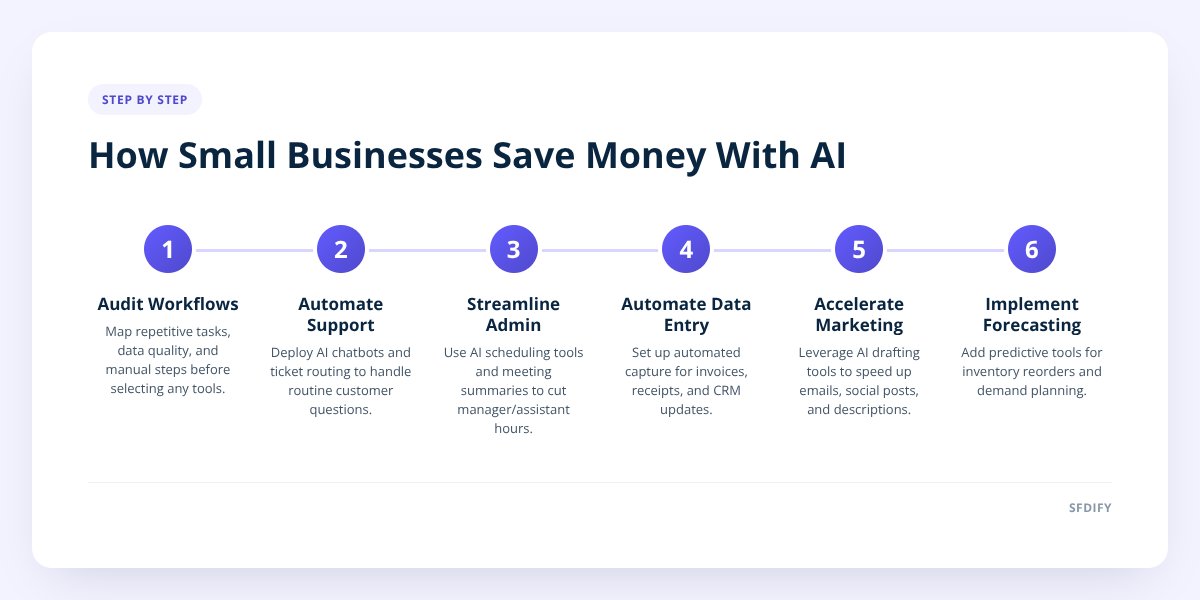
The Five Categories Where AI Actually Cuts Costs
Firms often apply AI to supporting functions like marketing and customer service [1]. Here's the breakdown, in the order most consultants tackle it:
- Customer support — AI chatbots and ticket-routing tools handle repetitive questions (order status, hours, return policy) so staff only handle the complex cases. In a study of 5,179 support agents, an AI assistant raised issues resolved per hour by 14% on average, and by 34% for novice workers [3].
- Scheduling and admin — AI-powered calendar tools, appointment reminders, and meeting summarization cut the hours a manager or assistant spends on logistics.
- Data entry and reporting — Automated data capture (invoices, receipts, CRM updates) removes hours of manual typing and reduces the errors that come with it. Invoice-extraction models, for example, pull customer name, due date and amount due from scanned or phone-captured invoices [5].
- Marketing content — AI drafting tools speed up first drafts of emails, social posts, and product descriptions, cutting the time a marketing hire or agency spends on volume work. In an MIT experiment on professional writing tasks, ChatGPT cut completion time by 40 percent [4].
- Inventory and demand forecasting — Predictive tools flag reorder points and slow-moving stock before a manager has to notice it manually.
Picture this as a funnel: support and admin are usually the fastest wins because the tasks are repetitive and low-risk to automate. Forecasting tends to come last, since it requires clean historical data before an AI tool can make useful predictions — Microsoft's forecasting documentation says accuracy depends on having as much historical demand data as you can get per item [6].
How Much of a Business's Workload Actually Gets Automated?
It depends entirely on how repetitive the current workload is — a service business with lots of scheduling and email traffic will see more automation potential than a business built on custom, one-off client work. There's no universal percentage, and any consultant who quotes one without seeing your operations first is guessing.
What's more useful is looking at the type of task, since some categories are naturally easier to automate than others:
| Task type | Automation potential | Why |
|---|---|---|
| Repetitive, rules-based (data entry, FAQs) | High | Clear inputs and outputs, low judgment required |
| Semi-structured (scheduling, follow-up emails) | Medium-high | Some judgment, but patterns are consistent |
| Creative first drafts (marketing copy, product descriptions) | Medium | AI drafts well, but a human still edits |
| Judgment-heavy (pricing decisions, complex client issues) | Low | Requires context AI tools don't reliably have |
A consultant's job is largely about sorting a business's actual task list into this kind of table before recommending anything — which is a big part of what separates paid consulting from just buying a chatbot subscription. We cover that distinction in more detail in AI Consulting vs. AI Integration: What's the Difference?
Why Do Some Businesses See Bigger Savings Than Others?
The businesses that save the most are the ones with clean, documented processes before AI ever enters the picture. If a workflow is messy — inconsistent data, no clear steps, three different people doing the same task three different ways — an AI tool usually just automates the mess faster.
That's why a serious AI engagement almost always starts with a process audit, not a tool purchase. A consultant maps out:
- Which tasks are repeated daily or weekly across the team
- Where data currently lives and how clean or fragmented it is
- Which steps require human judgment versus which are purely mechanical
- What the current cost of the manual version actually is, in hours or dollars
buying an AI tool before mapping the workflow it's supposed to fix is the single most common way small businesses waste money on automation. We go deeper on this in Common Mistakes Businesses Make Automating Workflows With AI.
What Does an AI Consulting Engagement Actually Cost?
Costs vary by project scope, but the money generally breaks down across three phases: assessment, build, and ongoing support. A short discovery engagement to audit workflows and recommend tools costs far less than a full custom integration connecting AI into a CRM or existing software stack.
Rather than quoting a flat number — which would vary too much by business size and complexity to be honest — it helps to know what drives the cost up or down:
- Number of systems involved. Connecting AI to one tool (like email) costs less than integrating across a CRM, inventory system, and website simultaneously.
- Data readiness. Businesses with clean, centralized data spend less on the setup phase than those with scattered spreadsheets and disconnected tools.
- Custom vs. off-the-shelf. A pre-built chatbot costs less upfront than a custom-trained model built around a specific business's products or FAQs.
- Ongoing maintenance needs. Some tools run largely on autopilot after setup; others need regular retraining or monitoring, which adds to long-term cost.
If Salesforce is part of the stack, the cost structure follows a similar phase-by-phase logic — we broke that down separately in Salesforce Consulting Costs: A Phase-by-Phase Breakdown.
Which Industries See the Fastest Return From AI Automation?
Businesses with high call or message volume and repetitive questions tend to see the fastest payback. That includes home services, salons and spas, medical and dental offices, restaurants, and retailers with online storefronts. The common thread isn't the industry itself — it's volume. A business fielding the same five questions 50 times a week gets more value from automating those answers than a business with low, highly varied customer contact.
Professional services — law firms, accounting firms, consultants — see slower but still real returns, usually from document handling and intake forms rather than customer-facing chat. If you're earlier in exploring what AI consulting even covers before deciding where to start, AI Consulting 101: What Small Businesses Should Know is a good starting point.
Checklist: Is Your Business Ready to Estimate AI Savings?
Before you can put a real number on potential savings, gather the basics:
- List every repetitive task your team does weekly (support replies, data entry, scheduling, reporting)
- Track roughly how many hours each task takes across the team per week
- Note where the data for each task currently lives (spreadsheet, CRM, paper, email)
- Flag which tasks require judgment calls versus which follow a fixed set of rules
- Identify who on staff currently owns each task, so you know who'd be freed up
- Get a rough hourly cost for that staff time to compare against a consultant's quoted setup cost
This exercise alone often reveals where the savings will come from before a consultant ever gets involved — and it makes any conversation with a consultant faster and more accurate. If you're still deciding whether a consultant is worth it versus handling automation in-house, Automation Consultant vs. DIY Tools: When to Call Help walks through that decision in more detail.
How SFDIFY can help: SFDIFY helps businesses decide where AI pays off and how to roll it out, starting with a free consultation. See our AI consulting services.
Getting Started Without Overcommitting
Small businesses don't need a full AI overhaul to see savings — most start with one category, usually customer support or scheduling, and expand from there once the first phase proves out. This staged approach limits risk and gives you real numbers on your own operation instead of general industry figures.
SFDIFY builds AI products (agents, copilots, search) and integrates them into existing systems, whether that's a support chatbot, a custom CRM connection, or a full AI-integrated software build. If you're trying to figure out where your business would see the fastest return, reach out to SFDIFY for a conversation about your specific operations.
Sources
- AI adoption in business grows steadily but unevenly (Federal Reserve Bank of Minneapolis) — checked 2026-11-08
- The Microstructure of AI Diffusion: Evidence from Firms, Business Functions, and Worker Tasks (U.S. Census Bureau) — checked 2026-11-08
- Generative AI at Work (NBER Working Paper 31161) — checked 2026-11-08
- Study finds ChatGPT boosts worker productivity for some writing tasks (MIT News) — checked 2026-11-08
- Invoice data extraction – Document Intelligence (Microsoft Learn) — checked 2026-11-08
- Import historical data for demand forecasts – Dynamics 365 Supply Chain Management (Microsoft Learn) — checked 2026-11-08