SFDIFY

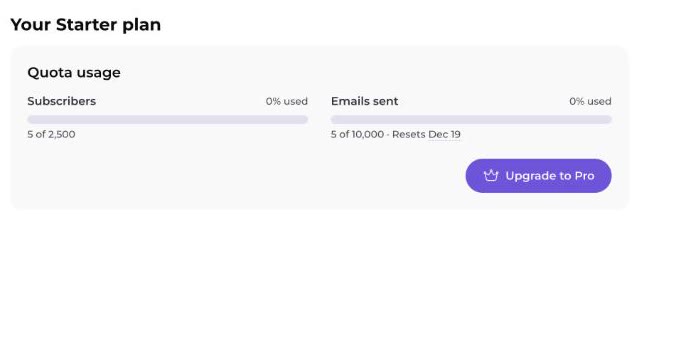
EmailOctopus is a plain, low-cost email marketing tool. Its free Starter plan covers "2,500 subscribers" and "10,000 emails per month" with no time limit [1, 2], which is roughly ten times the free list size Mailchimp offers [4]. In our test, importing contacts, building a personalised campaign and sending it took a few minutes, and every test email reached the Gmail inbox. The trade-offs are the free plan's branding, 30-day reports and single form, and the extra DNS setup you need before your emails stop showing "via" EmailOctopus's sending domain.
How we tested
We created a free EmailOctopus account on November 19, 2026, using our own business address. We imported a CSV of five contacts (all our own test addresses), built a campaign from a template with a first-name merge tag, sent it, opened the emails in Gmail, clicked a link, and watched the report. We also set up an automation and looked at the domain verification steps, without changing our DNS.
Pricing and plan limits come from EmailOctopus's pricing page and the Markdown price list it publishes, both read on November 19, 2026 [1, 2]. The Mailchimp and MailerLite figures come from our Mailchimp alternatives comparison, checked on November 8, 2026 [4, 5]. We did not test the paid Pro plan, and a five-email test can't measure deliverability at scale.
What EmailOctopus is
EmailOctopus is an email-only marketing platform. Its homepage puts it plainly: "No SMS, no clutter, no paying for extra services you don't need" [3]. You get campaigns, automations, forms and landing pages, tags and segments, reports and an API, plus integrations it says number "over 1,000 and counting" [3].
There are two products. The standard plans include a monthly email allowance. EmailOctopus Connect is for Amazon SES users: emails go through your own SES account, "so there is no monthly email limit from EmailOctopus" [2].
EmailOctopus pricing
| Plan | Subscribers | Emails per month | Price (USD) |
|---|---|---|---|
| Starter | Up to 2,500 | 10,000 | Free [2] |
| Pro | Up to 500 | 10,000 | $10/month, or $9/month billed yearly [2] |
| Pro | 501 to 1,000 | 10,000 | $13.50/month, or $12/month billed yearly [2] |
| Pro | 1,001 to 2,500 | 25,000 | $20/month, or $18/month billed yearly [2] |
| Pro | 2,501 to 5,000 | 50,000 | $31.50/month, or $28/month billed yearly [2] |
| Pro | 7,501 to 10,000 | 100,000 | $44.50/month, or $40/month billed yearly [2] |
Annual plans "are paid for a year up front" [2]. Prices are also listed in GBP, EUR, CAD and AUD, and lists over 500,000 subscribers get a custom quote [2]. If your list outgrows your tier, EmailOctopus says "we'll move you up to the plan that fits your new contact size" and emails you when it happens [1]. Nonprofits "get a 20% lifetime discount" [1].
There is no free trial. EmailOctopus says "We don't offer a free trial" and points you to the free plan instead [1].
What the free plan leaves out. Starter carries "EmailOctopus branding on emails", keeps "Reports available for 30 days", lets you "Create 1 landing page and 1 form" and gives "Access for 1 user" [1]. Pro adds "Reports available forever", "Unlimited landing pages and forms" and "Add unlimited users" [1], plus "Gradual sending" to "Spread a campaign send over up to 24 hours" and "Smart timing" [1].
Importing contacts
Contacts can come from a file (csv, dsv, txt or xlsx), from another platform, or one at a time. We uploaded a five-row CSV with email, first name, last name and a tag column. EmailOctopus matched all four columns by itself, including the comma-separated tags, and the import finished in seconds.
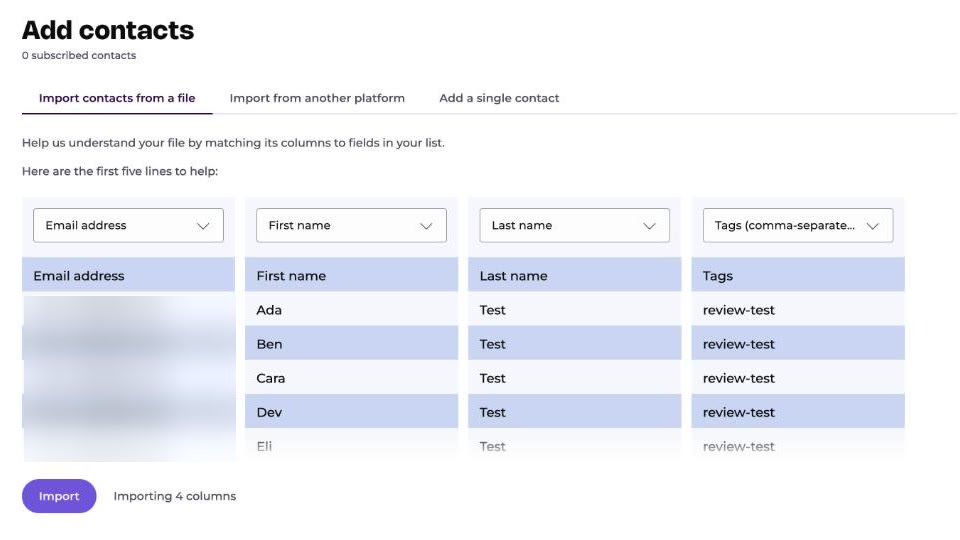
One thing to know: the import screen warns that imported contacts "will not receive a confirmation email", so the permission to email them is your responsibility.
Building and sending a campaign
Campaign setup is one screen: sender name and address, subject (with emoji and merge tags), preview text, and the audience, which can be everyone, a segment, a tag or an advanced filter. Open and click tracking are on by default.
For the design, you can start from six branded templates, browse a larger "Inspirational" library (109 templates when we looked), drag and drop from scratch, or paste your own code. The editor offers nine blocks: title, text, logo, image, video, button, social follow, divider and code. It also pulled our logo in automatically from the brand details we had entered.
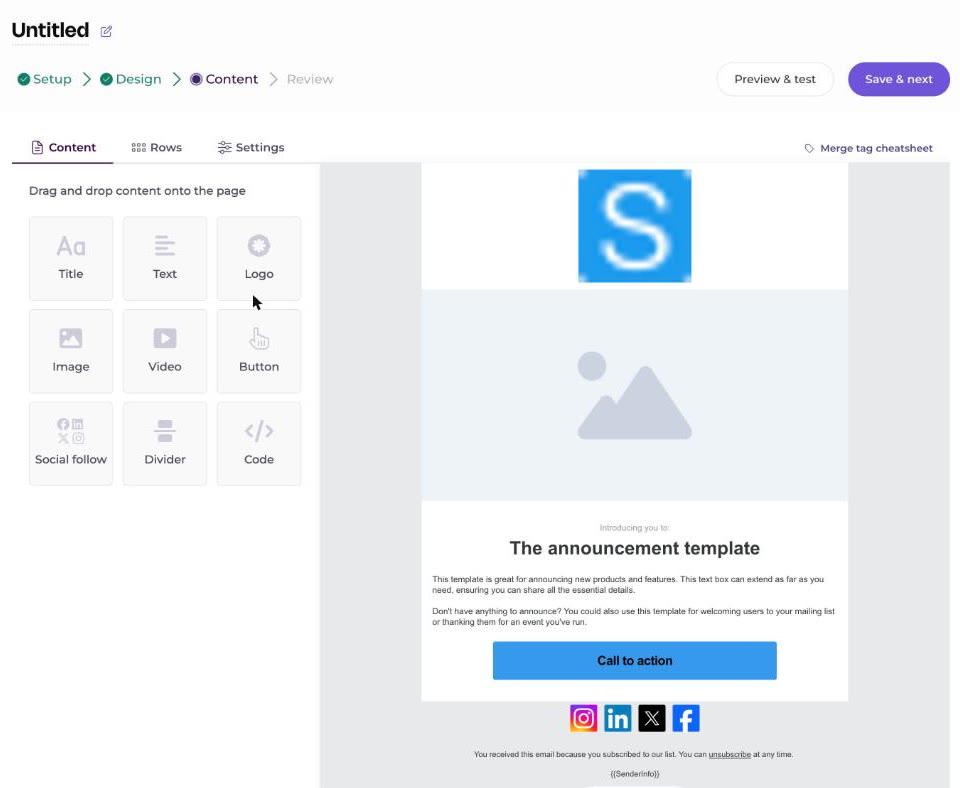
We changed the headline to "Hi {{FirstName}}, this is a test". The preview lets you pick a real contact, so we could see "Hi Ada" on desktop and mobile before sending.
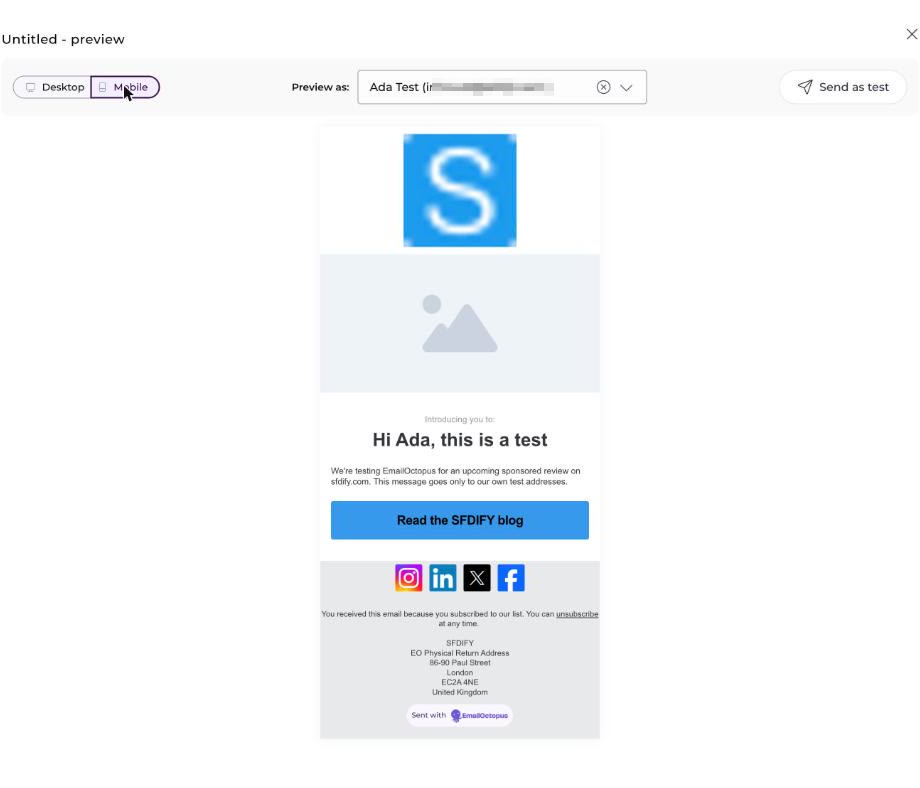
Two details showed up in the preview. The free plan adds a "Sent with EmailOctopus" badge to the footer. And because we hadn't entered our own postal address, the footer used EmailOctopus's London return address. Add your own sender details before a real send, so readers see your business.
The final step asks whether to send now or schedule. "More sending options" is marked Pro, and the confirmation box warns that you can't cancel or edit once you confirm.
Delivery and tracking
We sent the campaign at 9:35 AM Central. All five emails were in the Gmail inbox of our Google Workspace account by 9:36, none in spam, delivered over TLS.
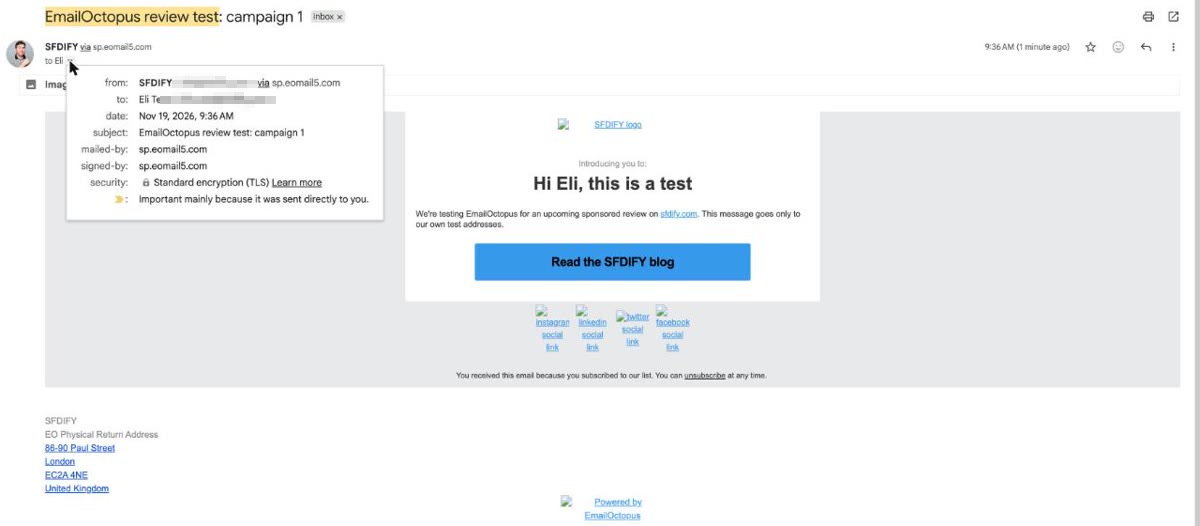
Gmail did show the sender as "SFDIFY via sp.eomail5.com", with EmailOctopus's domain as the signing domain, and it hid the images until a reader chooses to show them. That is normal for any email tool before you verify your own domain. EmailOctopus's Senders page offers "Verify domain (recommended)": it detected our DNS host and asked for four CNAME records. If your emails matter to your brand, do this on day one.
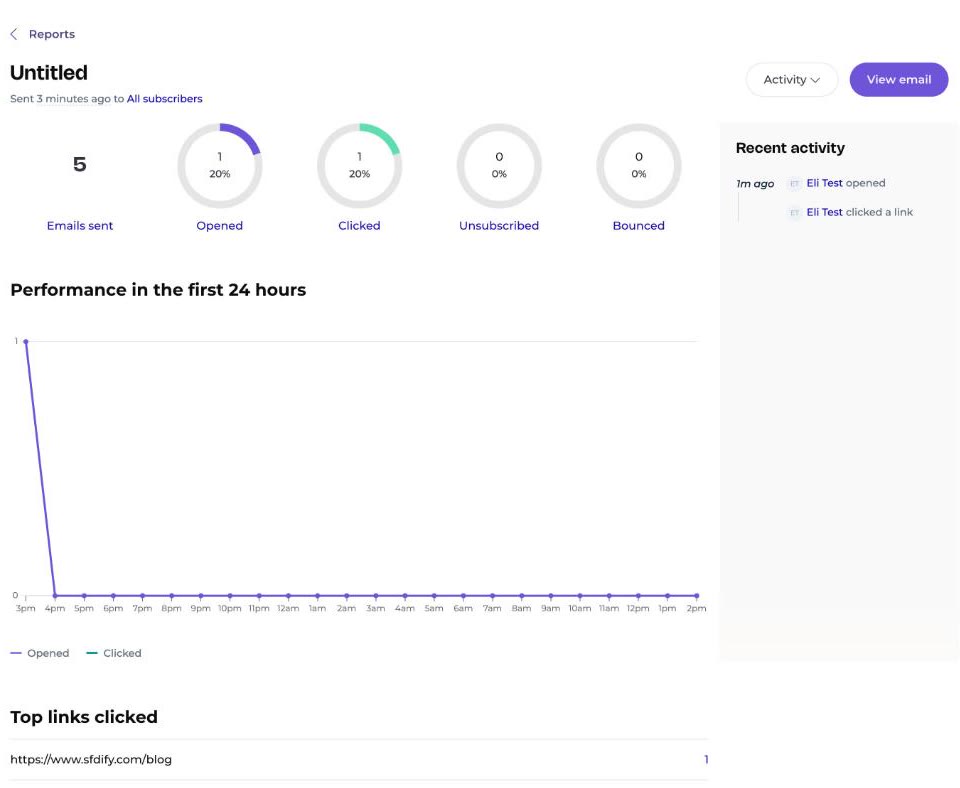
We then clicked the button in one email. The redirect went straight to our blog, and the report showed that contact's open and click about two minutes later, with a list of the top links clicked.
Automations
You can start from six templates (simple welcome, birthday, one-year check-in, re-engagement, landing page freebie, and a weekly email course) or build from scratch. There are eight triggers: contact added, field updated, tag added, tag removed, started by another automation, started through the API, anniversary of a date, and a specific date.
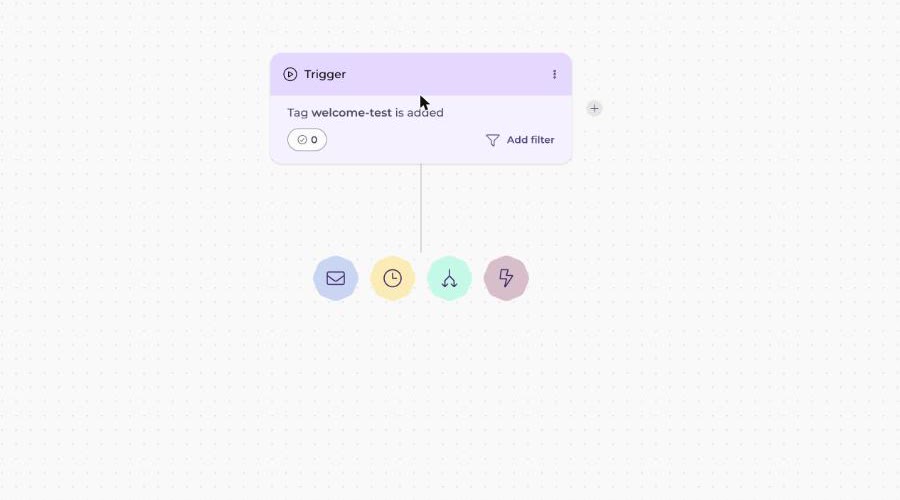
The builder is a visual canvas with four kinds of step: email, delay, branch and action. Actions can update a field, add or remove a tag, unsubscribe the contact, or start another automation. We built one on the free plan without hitting a limit; the upgrade screen lists "Unlimited automations with no practical limits" as a Pro benefit, so heavier automation users should expect to pay.
Support
EmailOctopus says the free plan "includes ongoing email support and chat support for the first 30 days", and Pro gets "priority chat and email support" [1]. It also says its "average response time on live chat is 9 seconds" [1]. We did not contact support during this test, so we can't confirm that figure.
Strengths
- A large free plan: 2,500 subscribers and 10,000 emails a month with no time limit [2].
- Low, published Pro prices at every list size, in five currencies [2].
- Fast setup. Import, design, personalise and send took us a few minutes.
- A real automation builder with eight triggers.
- Nonprofits get 20% off for life [1].
Limitations
- Free emails carry EmailOctopus branding, and reports disappear after 30 days [1].
- One landing page, one form and one user on the free plan [1].
- No free trial of Pro [1].
- Until you verify your domain, Gmail shows your emails as sent "via" EmailOctopus's domain.
- Email only, by design: no SMS, so you'd need a second tool for texting [3].
EmailOctopus vs Mailchimp and MailerLite
At around 1,000 contacts on monthly billing, EmailOctopus Pro is $13.50 [2]. Our Mailchimp comparison found Mailchimp Essentials at $26.50 for 501 to 1,500 contacts [4] and MailerLite Comfort at $19 [5]. On the free side, Mailchimp's plan is for lists "Under 250 contacts" [4], while EmailOctopus covers 2,500 [2].
Those are list prices from different dates (ours were checked on November 8 and 19, 2026), and each tool bundles features differently, so compare the plan pages yourself before switching. Our Mailchimp alternatives guide covers six more options.
How SFDIFY can help: SFDIFY designs and builds websites, web apps and custom software for growing businesses, and the first consultation is free. See all SFDIFY services.
FAQ
Is EmailOctopus free?
Yes. The Starter plan is free for up to 2,500 subscribers and 10,000 emails a month, with no credit card and no time limit [1, 2]. Emails on the free plan carry EmailOctopus branding, reports are kept for 30 days, and you get 1 landing page, 1 form and 1 user [1].
How much does EmailOctopus Pro cost?
Pro is priced by list size. In US dollars it is $10 a month for up to 500 subscribers, $13.50 for 501 to 1,000 and $20 for 1,001 to 2,500, or $9, $12 and $18 a month on annual billing, which is paid a year up front [2].
Does EmailOctopus have a free trial?
No. EmailOctopus says it does not offer a free trial and recommends starting on the free Starter plan instead, which has no time limit [1].
Did EmailOctopus emails reach the inbox in your test?
In our small test, all 5 emails reached the Gmail inbox of our Google Workspace account within a minute, and none went to spam. Five messages to one mailbox is not a deliverability study, so treat it as a sanity check only.
Is EmailOctopus cheaper than Mailchimp?
At around 1,000 contacts, EmailOctopus Pro is $13.50 a month on monthly billing [2], while our Mailchimp comparison found Mailchimp Essentials at $26.50 a month for 501 to 1,500 contacts [4]. EmailOctopus's free plan also covers 2,500 subscribers, against fewer than 250 contacts on Mailchimp's free plan [2, 4].
Our verdict
EmailOctopus suits small businesses, newsletters and nonprofits that want straightforward email marketing without paying for a bigger suite. The free plan is generous enough to run a real newsletter for a list of up to 2,500, and Pro stays cheap as you grow [2]. Verify your domain and add your own sender details before your first real send. If you need SMS, a large set of landing pages on a free plan, or long report history without paying, look at Pro or at the alternatives in our comparison.
Sources
- Pricing | EmailOctopus — checked 2026-11-19
- EmailOctopus pricing (Markdown price list) — checked 2026-11-19
- Email marketing made easy | EmailOctopus — checked 2026-11-19
- Mailchimp Pricing Plans | Get Started Today | Mailchimp — checked 2026-11-08
- Simple, Transparent Pricing - MailerLite — checked 2026-11-08